There are many kinds of video encoder in the market and a report from MeFeedia recently shows that H.264 shares 80% of the video encoder market. Why H.264 is so popular and what is H.264? Please read this article.
According to the report from MeFeedia, over 80% videos are using H.264 as their encoder. If the video is using HTML 5 video tag, it can be played on iPad directly without any help. Of course, this is not mean that you must do that or do that at present. This only means that if you do hope using the same version of video for iPad and other ways, you do not need to reencode you video with other encoder, you just need to use HTML 5 instead of Flash. This report also points that H.264 is now used widely and really popular. A research on Jan. 2010, at that time, only 10% video was using H.264. And the number rises to 80% after only two years.
Thanks to the iPad and other devices's popular, H.264 now dominates the world of video encoder. Most of the devices such as iPad, iPhone, etc support the H.264 hardware acceleration. At May, 2010, the report from MeFeeia showed that only 26% video use H.264 as video encoder.
It's clear that the file which supports HTML 5 is now influce the Giant more and more in video market. Such as Adobe announced that they will no longer provide Flash Player for mobile devices's web browser, all kinds of operation system and other devices. Although WebM from Google has been become open source, it develops really slow. A report from MeFeedia, only 2% video use Google's VP8 as their video encoder. That means that the Google's purchase of On2 Technologies benefits Google nothing at all.
With more and more devices support H.264, the share of it will be higher in the future. Only in case that there is a competitor with enough competitiveness and widely used in the devices which support hardware acceleration, H.264 will be the winner in the war of video encoder.
What is H.264?
H.264/MPEG-4 Part 10 or AVC (Advanced Video Coding) is a standard for video compression, and is currently one of the most commonly used formats for the recording, compression, and distribution of high definition video. The final drafting work on the first version of the standard was completed in May 2003.
H.264/MPEG-4 AVC is a block-oriented motion-compensation-based codec standard developed by the ITU-T Video Coding Experts Group (VCEG) together with the International Organization for Standardization (ISO)/International Electrotechnical Commission (IEC) Moving Picture Experts Group (MPEG). It was the product of a partnership effort known as the Joint Video Team (JVT). The ITU-T H.264 standard and the ISO/IEC MPEG-4 AVC standard (formally, ISO/IEC 14496-10 – MPEG-4 Part 10, Advanced Video Coding) are jointly maintained so that they have identical technical content.
H.264 is perhaps best known as being one of the codec standards for Blu-ray Discs; all Blu-ray Disc players must be able to decode H.264. It is also widely used by streaming internet sources, such as videos from Vimeo, YouTube, and the iTunes Store, web software such as the Adobe Flash Player and Microsoft Silverlight, broadcast services for DVB and SBTVD, direct-broadcast satellite television services, cable television services, and real-time videoconferencing.
Pele Gao is the author of Video Converter for Mac. If you are interested in DVD Ripper for Mac, please click here.
2011年12月31日星期六

2011年12月30日星期五
Why Google Pays 10 Billion USD to Its Competitor Mozilla?
To Make Google as the default search engine, Google and Mozilla will renew the cooperation agreement at around 10 billion USD. In the case of haveing their own web browser "Chrome", Google's cooperation with Mozilla is understood as a kind of support to their competitor with their money. But Why?
On one hand, Firefox still has millions of users and this agreement means that millions of users will use Google as the default search engine when they are using Firefox. And using Google to search means Google can display ads and that means money to Google.
But 3 billion per year, that is 3 times more than the price in the agreement they signed in 2008. What's interesting is that Google released Chrome after they signed the agreement in 2008. From a common point of view, with the raise of the Chrome's share in web browser market, they should reach an agreement at a lower price. Although Firefox still takes up 1/3 of the web broswer market, their share is going down and the reason is Chrome.
Chrome is like a beast in the market of browser, it is swallowing the share of IE and also Firefox at the same time. Actually, according the the data from StatCounter, Firefox's share in browser market is lower than 2008. Think about it. Aug, 2008, 26.08% of people were using Firefox as their browser, 68.91% were using IE and at that time, Chrome was not released by Google. Last month, 25.23% of people were using Firefox as their default web browser and 40.63% of them were using IE. Chrome took 25.69% of the market. It's true that more people are choosing Chrome as their default web browser than choosing Firefox.
So Google will pay 3 times money, while Firefox's share in browser market is lower than 2008. Why they do that?
The first reason comes to my mind is the competition. Because of the bid. Microsoft wants Bing become the default search engine of Firefox. And it is really interesting that Yahoo also takes part in the bid and Yahoo's search engine is from Bing. So one reason is that Google spend money to let Microsoft and Yahoo out of the game. It's possible.
Microsoft spends billions of USD to try to compete with Google in search engine market. One of the result of this is that Google and Bing swallow Yahoo's share in search engine market together. Now Bing provides the result of Yahoo's search engine, so Bing hurts itself. Nowadays, Bing and Yahoo take the same percent of the search engine market share and Bing is paying this. Here I have to say that Bing and Firefox's cooperation is do useful to Bing. Let's say that Bing know that and when they talking about the cooperation, they are not cheapskate, but they are not that generous and will pay 3 billion a year. Because from the market share, 3 billion is a little crazy.
So why Google still pay this high price to Firefox? Analyst said that compare with the income from displaying ads through Firefox and competition with Bing, avoiding the problem of anti-monopoly after Chrome's share continue growing is the real problem Google cares.
It's not crazy, actually if now it is not the reason, it will be the reason in future. So far, it is relatively safe for Google's browser market in anti-monopoly. They are not like Microsoft and Apple, Google can not control the default browser in any kind of operation system. However, the problem will become more and more serious with the large download of Chrome from google.com and the success of Chrome OS. I think there will be a larger pressure from mobile devices. Now, web browser on Android devices looks like a normal browser, with more and more element from Chrome are added to it. It will become the real Chrome some day.
That means Google has a dominant operation system (Android) to promote their web browser. That will bring investigation from anti-monopoly just like Microsoft few years ago. But if Google pays money to support Mozilla and Firefox, it's another question. Let's wait and see.
2011年12月28日星期三
Experience Sharing: Ten Steps to Perfectly Jailbreak Your iOS 5.0.1
On July 26, 2010, the Library of Congress officially repaired several exemption clauses in the Digital Millennium Copyright Act and it formally recognized the legitimacy of the IOS jailbreak.
Jay Freeman,the founder of Cydia, Jailbreak software community, said about 10% of the global iPhones had escaped.
Now the redsn0w 0.9.10b1, which can perfectly jailbreak iOS 5.0.1 has just released. Currently, it supports iPhone 3GS, iPhone 4, iPhone 4 CDMA edition, iPad 1, iPod touch 3G, iPod touch 4G. However, the iPhone 4S, iPad 2, using A5 processor still can not escape.
Please check the device Settings - > General > On the Machine to inspect equipment running on the firmware version, if you are running older versions of the firmware, you will update it to the 5.0.1 then jailbreak.
Step 1, Download redsn0w_win_0.9.10b1, then Decompression attachment and open redsn0w.exe
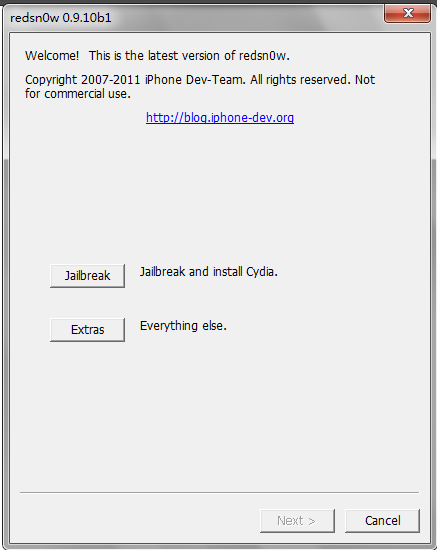
Step 2, Click the “Jaibreak” button on the map
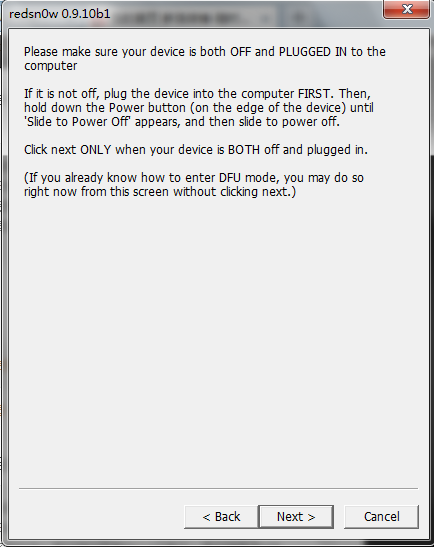
Step 3, Make sure your iOS device is switched off, and the data line is connected to a computer.
Step 4, During the Jailbreak process, you need first enter DFU mode. The concrete operation process has three steps. First, hold the key for several seconds. After the prompt field grey, go to the next step.
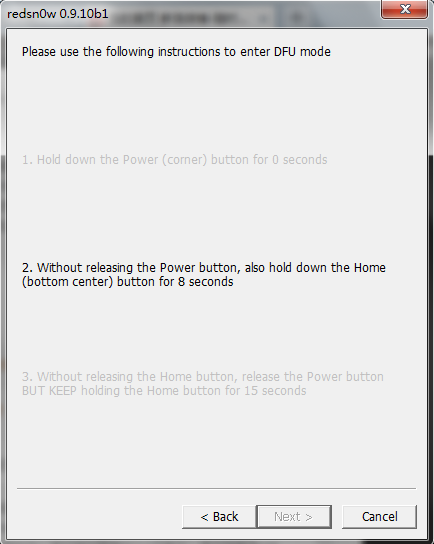
Step 5, After that, don't let go the open key, and also hold down the HOME key for 10 seconds.
Step 6, Release the open key, but continuing to hold down the home key for 15 seconds
Step 7, If you succeed, there will be a progress bar.
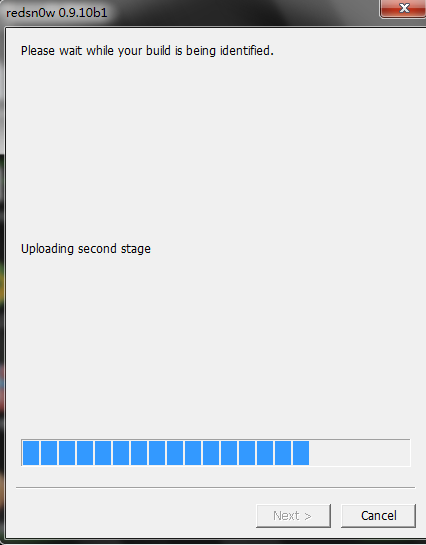
Step 8, If the following interface appears, select the" Install Cydia" to start installing the Cydia to iOS equipment.
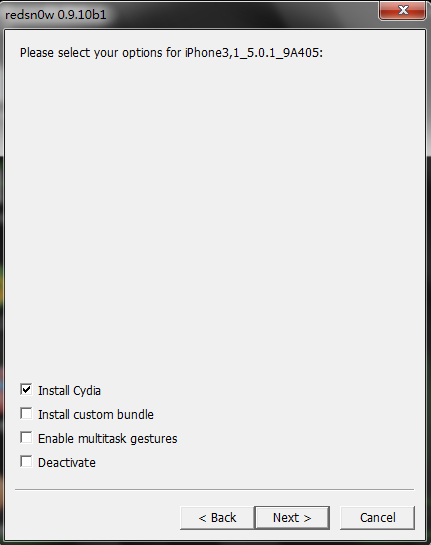
Step 9, After a while, your iOS device appears English covering the screen, this demonstrates file uploading.
Step 10, Two or three minutes later, your mobile phone will reboot, and you can see the Cydia Icon
Finally, I say one more word: although the jailbreak can bring you some new functions, it may also lead to the instability of the system, power consumption increasing, etc. So think twice and then make the decision according to your needs.
2011年12月27日星期二
Experience Sharing: How to Convert DVD movies to iPad More Easily.
Hi, Buddies! Today i'd like to share with you a magic multimedia conversion tool, which can Rip DVD movies to iPad without any quality losing. It is the seventh app i have tried, and it enjoys high honor on google and many iPad users.
The reason i'd like to share with you is just because of my experience:
The other days, a very little mistake drived me crazzy on iPad. I planned to copy some DVD movies onto my iPad so that i can watch them when i travel. I think this is a good idea to kill the boring time. However, as is known to all, iPad supports only the video formats below:
* H.264 video up to 720p, 30 frames per second, Main Profile level 3.1 with AAC-LC audio up to 160 Kbps, 48kHz, Stereo file formats are M4v, Mp4 and Mov;
* MPEG-4 Video, up to 2.5 Mbps, 640 by 480 pixels, 30 frames per second, Simple Profile with AAC-LC audio up to 160 Kbps per channel, 48kHz, stereo audio in .m4v, .mp4, and .mov file formats;
* Motion JPEG (M-JPEG) up to 35 Mbps, 1280 by 720 pixels, 30 frames per second, audio in u-law, PCM stereo audio in .avi file format.
Audio formats supported like below:
* AAC (16 to 320 Kbps), Protected AAC; MP3 (16 to 320 Kbps), MP3 VBR, Audible, Apple Lossless, AIFF and WAV.
So i spare no effort to look for a DVD to iPad converter, while some can only Rip DVD to iPad, but couldn't convert to iPad video formats; and some will add watermark on the converted videos, which i can hardly watch on my iPad; what's more hateful, some free so-called can only damage my DVDs.
The above is my experience, and much more i guess you also met. So i will not waste time on it.
Now i'd like to show you how to do the conversion (from DVD to your iPad) step by step, and also i add some screenshots here.
First, you need to download this DVD to iPad Converter and install it on your computer( Download is free and also it provides free-try function).
Step 1: Run the converter and load DVD
After running the application on your computer, click the "Load DVD" button to input any DVD disc, DVD folder, and DVD IFO.
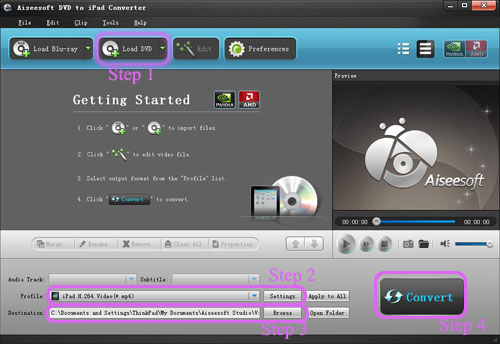
Step 2: Customize output video
This DVD to iPad Converter owns powerful video editing functions. With it, you can easily trim video length, crop video frame, watermark video, add any watermark to your video and even adjust video brightness, saturation and contrast.
Step 3: Choose proper output profile
This tool provides users with many output profiles. You can click the drop-down list of Profile option and choose the proper profile that suits you best.
Step 4: Start ripping DVD to iPad
After all these settings, you can click on the "Start" button to start the DVD to iPad conversion. After a while, you will successfully rip DVD to iPad.
Now you can transfer the output iPad files to your iPad through iTunes and enjoy them conveniently.
Now i finished and hope my experience and information can really be helpful for you, and also i hope we can communicate on the common habiits.
The reason i'd like to share with you is just because of my experience:
The other days, a very little mistake drived me crazzy on iPad. I planned to copy some DVD movies onto my iPad so that i can watch them when i travel. I think this is a good idea to kill the boring time. However, as is known to all, iPad supports only the video formats below:
* H.264 video up to 720p, 30 frames per second, Main Profile level 3.1 with AAC-LC audio up to 160 Kbps, 48kHz, Stereo file formats are M4v, Mp4 and Mov;
* MPEG-4 Video, up to 2.5 Mbps, 640 by 480 pixels, 30 frames per second, Simple Profile with AAC-LC audio up to 160 Kbps per channel, 48kHz, stereo audio in .m4v, .mp4, and .mov file formats;
* Motion JPEG (M-JPEG) up to 35 Mbps, 1280 by 720 pixels, 30 frames per second, audio in u-law, PCM stereo audio in .avi file format.
Audio formats supported like below:
* AAC (16 to 320 Kbps), Protected AAC; MP3 (16 to 320 Kbps), MP3 VBR, Audible, Apple Lossless, AIFF and WAV.
So i spare no effort to look for a DVD to iPad converter, while some can only Rip DVD to iPad, but couldn't convert to iPad video formats; and some will add watermark on the converted videos, which i can hardly watch on my iPad; what's more hateful, some free so-called can only damage my DVDs.
The above is my experience, and much more i guess you also met. So i will not waste time on it.
Now i'd like to show you how to do the conversion (from DVD to your iPad) step by step, and also i add some screenshots here.
First, you need to download this DVD to iPad Converter and install it on your computer( Download is free and also it provides free-try function).
Step 1: Run the converter and load DVD
After running the application on your computer, click the "Load DVD" button to input any DVD disc, DVD folder, and DVD IFO.
Step 2: Customize output video
This DVD to iPad Converter owns powerful video editing functions. With it, you can easily trim video length, crop video frame, watermark video, add any watermark to your video and even adjust video brightness, saturation and contrast.
Step 3: Choose proper output profile
This tool provides users with many output profiles. You can click the drop-down list of Profile option and choose the proper profile that suits you best.
Step 4: Start ripping DVD to iPad
After all these settings, you can click on the "Start" button to start the DVD to iPad conversion. After a while, you will successfully rip DVD to iPad.
Now you can transfer the output iPad files to your iPad through iTunes and enjoy them conveniently.
Now i finished and hope my experience and information can really be helpful for you, and also i hope we can communicate on the common habiits.
2011年12月25日星期日
Full Guide: How to Convert DVD to MP4, AVI, 3GP, iPod ......
DVD is the first choice for many people when they want to watch movies at home. It has high quality picture, different subtitles and audio tracks and most important, some of the DVD movies are more enjoyable than than the cinema one.
However, when we travel, when the disc is broken, when we want to backup the DVD movies, when we want to share the movies with friends, when we want to make usage of the movie, what should we do?
Convert DVD to video video formats you need.
This guide aims to show you how to convert DVD to different video format both for windows/mac users.
Part 1: How to Convert DVD on Windows with DVD Converter
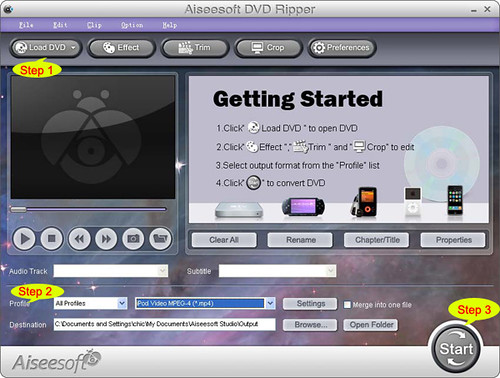
Step 1: Load DVD
Put your DVD to your DVD Drive and click “Load DVD” button to add your DVD
Step 2: Choose Profile
Choose your output video profile from a drop-down list.
Step 3: Start Conversion
Part 2: How to Convert DVD on Mac with DVD Ripper for Mac
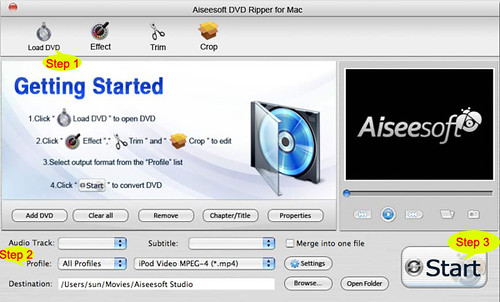
Step 1: Load DVD
Click the “Load DVD” button, find the DVD folder of the movie you want to add from your DVD-ROM, and Click “Open”.
Step 2: Choose output profile and settings
Selecting output format is really easy, you can chose your output format according to your devices players and the default setting works great.
For a veteran of digital player, you could customize your own settings by clicking “Settings” button to chose your own video resolution, frame rate, bit rate, encoder, etc.
Step 3: Start Conversion
If you want to convert both DVD and videos, here is a really powerful DVD Converter Suite. It can help you to convert DVD and videos easily. It can also help you to backup the iPod music and videos to your computer.
However, when we travel, when the disc is broken, when we want to backup the DVD movies, when we want to share the movies with friends, when we want to make usage of the movie, what should we do?
Convert DVD to video video formats you need.
This guide aims to show you how to convert DVD to different video format both for windows/mac users.
Part 1: How to Convert DVD on Windows with DVD Converter
Step 1: Load DVD
Put your DVD to your DVD Drive and click “Load DVD” button to add your DVD
Step 2: Choose Profile
Choose your output video profile from a drop-down list.
Step 3: Start Conversion
Part 2: How to Convert DVD on Mac with DVD Ripper for Mac
Step 1: Load DVD
Click the “Load DVD” button, find the DVD folder of the movie you want to add from your DVD-ROM, and Click “Open”.
Step 2: Choose output profile and settings
Selecting output format is really easy, you can chose your output format according to your devices players and the default setting works great.
For a veteran of digital player, you could customize your own settings by clicking “Settings” button to chose your own video resolution, frame rate, bit rate, encoder, etc.
Step 3: Start Conversion
If you want to convert both DVD and videos, here is a really powerful DVD Converter Suite. It can help you to convert DVD and videos easily. It can also help you to backup the iPod music and videos to your computer.
2011年12月24日星期六
Does Apple Release Useful and Practical iPad Converter Suite?
iPad becomes a hot topic nowadays and almost everyone wants to own one for it is great and exciting to watch movies or read books on iPad no matter where you go. However, it is known to all that the video and audio formats with which iPad is compatible are limited. Therefore, to view DVD or videos like AVI, FLV, TS, RM, RMVB, WMV, ASF, MKV, RM, RMVB, 3GP etc. on iPad, you have to convert them to iPad supporting format with a iPad converter; to keep your iPad files from losing or being damaged, you have to backup or copy them to computer. There is a shortcut for you: iPad Converter Suite is absolutely your best assistant to help you manage your iPad or iPad 2.
iPad Converter Suite composed of DVD to iPad Converter, iPad Video Converter and iPad Transfer, provides users with powerful editing functions so that they can customize the output files according to their preference. Both of the DVD to iPad Converter and iPad Video Converter enable users to get the most ideal and best effects by trimming and cropping videos, merging several videos or clips to a whole single one, adjusting visual effect through resetting video brightness, contrast and saturation, and adding watermark to the output videos and so forth. In addition, you will be amazed and attracted by the iPad Transfer which can search and automatically detect all the files and information quickly and directly when operating the transferring music/video/image between iPad and computer.
In a word, the iPad Converter Suite can and should be your best choice if you want to manage your iPad in the simplest and most efficient way. It can really lead you to a fantastic and magic software world; why not have a try?
Price and Availability
iPad Converter Suite is now priced at $ 35.00
System Requirements
OS Supported: Windows NT4/2000/2003/XP and Windows Vista, Windows 7
Hardware Requirements: 800MHz Intel or AMD CPU, or above; 512MB RAM or more
About Aiseesoft Studio
As a professional multimedia software provider, Aiseesoft Studio is dedicated to developing the best multimedia desktop applications to help the Windows and Mac users smoothly convert, edit and transfer various video/audio files. In order to meet users' various requirements, Aiseesoft Studio constantly brings in new ideas, technologies, etc.2011年12月23日星期五
iPod Converter Reviews: how to convert video for iPod, iPhone,iPhone Ringtone
As a crazy fan of iPod and iPhone, many friends come and ask me about how to enjoy movies and videos on their iPod and also they want unique ringtone for their iPhone. Too many people asking those questions, so I spend some time to make this article to show my dear friends that how to enjoy movies on iPod and iPhone and also how to make your own iPhone ringtone.
There are 3 parts in my article:
Part 1: How to put movie and videos on your iPod.
Part 2: How to put movie and videos on your iPhone
Part 3: How to make your own iPhone ringtone
Part 1: How to put movie and videos on your iPod.
If you want to put movie/video on your iPod, you must know what kind of video/movies can be played on your iPod. Look the following:
H.264
File formats: .m4v, .mp4, and .mov
Video: Up to 768 kbits/sec, 320 x 240, 30 frames per second (fps), Baseline Profile up to Level 1.3.
Audio: AAC-LC up to 160 kbits/sec, 48 Khz, and stereo audio.
MPEG-4
File formats: .m4v, .mp4, and .mov
Video: Up to 2.5 Mbits/sec, 480 x 480, 30 fps, Simple Profile.
Audio: AAC-LC up to 160 kbits/sec, 48 Khz, stereo audio.
Wow, that looks really complicated, right? Actually it is really easy to make such video/movie for you iPod. You just need Aiseesoft
iPod Movie Converter.
Ok, let's begin.
Step 1. Load Video
Click “Add File” to load the video/movie that you want to put on your iPod.
Step 2. Choose Profile and Settings
You can choose your output profile on a drop-down list.
Click “Settings” button you can adjust the details of your output video/movie
Step 3. Conversion
Everything is ready and you just need to click “Start” button to begin the conversion.
Tips:
This powerful video convert for iPod allows you to do many video editing works to make your iPod video/movie more colorful.
1. Effect:
You can adjust your movie's effect, such as “Brightness”, “Contrast” and “Saturation”, and you can just check the output effect on the output preview window.
This powerful video converter allows you to choose “deinterlacing”.
2. Trim:
With trim function you can pick up any part of the video/movie to convert and put on your iPod.
There are 3 ways that you can trim your video.
a. You can drag the buttons to set the start and end time
b. You can preview the video first and when you want to start trim click the left one of the pair buttons when you want to end click the right one.
c. You can set the exact start and end time on the right side of the pop-up window.
3. Crop
Crop function allows you to pick up any play area to convert:
There are 2 ways that you can crop your video.
a. You can set your own mode on the bottom of the pop-up window
b. You can drag frame to set your own crop mode
In the Crop window, you can also choose your output “aspect ratio”.
Here it provides you 4 mode to choose: “keep original”, “full screen”, “16:9”, “4:3”
Part 2: How to put video/movie to iPhone
Actually, iPhone is much easier to deal with than iPod, because there are so many generations of iPod.
Put video/movie on iPhone, I use Aiseesoft iPod Movie Converter.
Step 1. Load Video
Click “Add File” to load the video/movie that you want to put on your iPhone.
Step 2. Choose Profile and Settings
You can choose your output profile on a drop-down list.
Click “Settings” button you can adjust the details of your output video/movie
Step 3. Conversion
Everything is ready and you just need to click “Start” button to begin the conversion.
Aiseesoft iPhone Movie Converter can also do video editing works, such as adjust the effect, pick up any part of the movie, choose play area. The operation is the same as Part 1.
Part 3: How to make your own iPhone ringtone
This time you need Aiseesoft iPhone Ringotne Maker.
Step 1: Click “Browse” on the right side of "Input File" to import the file that you want to make ringtone from it.
Step 2: Play it and listen the music to find the segment that you want to use it as ringtone. Then drag and click the start & end slider to set your wanted segment, or type the start & end time in the corresponding text box directly to get the exact segment. You also can pre-listen the converted audio before generate.
Step 3: Click “Browse” on the right side of "Local Output Folder" to choose the output destination.
Step 4: Check "Export to iPhone" option, the converted ringtone will be load to your iPhone directly.
Step 5: After all the settings are finished, click “Generate” to begin making your own iPhone ringtone.
Key function
● Convert any video to iPhone ringtone M4R
● Create iPhone ringtone from any audio files
● Get any clips from video and audio
● Edit Added iPhone ringtones
Using Aiseesoft iPhone Ringtone Maker, you are free to edit the added iPhone ringtone by removing it or renaming it directly.
There are 3 parts in my article:
Part 1: How to put movie and videos on your iPod.
Part 2: How to put movie and videos on your iPhone
Part 3: How to make your own iPhone ringtone
Part 1: How to put movie and videos on your iPod.
If you want to put movie/video on your iPod, you must know what kind of video/movies can be played on your iPod. Look the following:
H.264
File formats: .m4v, .mp4, and .mov
Video: Up to 768 kbits/sec, 320 x 240, 30 frames per second (fps), Baseline Profile up to Level 1.3.
Audio: AAC-LC up to 160 kbits/sec, 48 Khz, and stereo audio.
MPEG-4
File formats: .m4v, .mp4, and .mov
Video: Up to 2.5 Mbits/sec, 480 x 480, 30 fps, Simple Profile.
Audio: AAC-LC up to 160 kbits/sec, 48 Khz, stereo audio.
Wow, that looks really complicated, right? Actually it is really easy to make such video/movie for you iPod. You just need Aiseesoft
iPod Movie Converter.
Ok, let's begin.
Step 1. Load Video
Click “Add File” to load the video/movie that you want to put on your iPod.
Step 2. Choose Profile and Settings
You can choose your output profile on a drop-down list.
Click “Settings” button you can adjust the details of your output video/movie
Step 3. Conversion
Everything is ready and you just need to click “Start” button to begin the conversion.
Tips:
This powerful video convert for iPod allows you to do many video editing works to make your iPod video/movie more colorful.
1. Effect:
You can adjust your movie's effect, such as “Brightness”, “Contrast” and “Saturation”, and you can just check the output effect on the output preview window.
This powerful video converter allows you to choose “deinterlacing”.
2. Trim:
With trim function you can pick up any part of the video/movie to convert and put on your iPod.
There are 3 ways that you can trim your video.
a. You can drag the buttons to set the start and end time
b. You can preview the video first and when you want to start trim click the left one of the pair buttons when you want to end click the right one.
c. You can set the exact start and end time on the right side of the pop-up window.
3. Crop
Crop function allows you to pick up any play area to convert:
There are 2 ways that you can crop your video.
a. You can set your own mode on the bottom of the pop-up window
b. You can drag frame to set your own crop mode
In the Crop window, you can also choose your output “aspect ratio”.
Here it provides you 4 mode to choose: “keep original”, “full screen”, “16:9”, “4:3”
Part 2: How to put video/movie to iPhone
Actually, iPhone is much easier to deal with than iPod, because there are so many generations of iPod.
Put video/movie on iPhone, I use Aiseesoft iPod Movie Converter.
Step 1. Load Video
Click “Add File” to load the video/movie that you want to put on your iPhone.
Step 2. Choose Profile and Settings
You can choose your output profile on a drop-down list.
Click “Settings” button you can adjust the details of your output video/movie
Step 3. Conversion
Everything is ready and you just need to click “Start” button to begin the conversion.
Aiseesoft iPhone Movie Converter can also do video editing works, such as adjust the effect, pick up any part of the movie, choose play area. The operation is the same as Part 1.
Part 3: How to make your own iPhone ringtone
This time you need Aiseesoft iPhone Ringotne Maker.
Step 1: Click “Browse” on the right side of "Input File" to import the file that you want to make ringtone from it.
Step 2: Play it and listen the music to find the segment that you want to use it as ringtone. Then drag and click the start & end slider to set your wanted segment, or type the start & end time in the corresponding text box directly to get the exact segment. You also can pre-listen the converted audio before generate.
Step 3: Click “Browse” on the right side of "Local Output Folder" to choose the output destination.
Step 4: Check "Export to iPhone" option, the converted ringtone will be load to your iPhone directly.
Step 5: After all the settings are finished, click “Generate” to begin making your own iPhone ringtone.
Key function
● Convert any video to iPhone ringtone M4R
● Create iPhone ringtone from any audio files
● Get any clips from video and audio
● Edit Added iPhone ringtones
Using Aiseesoft iPhone Ringtone Maker, you are free to edit the added iPhone ringtone by removing it or renaming it directly.
2011年12月22日星期四
Aiseesoft Updates iPad Transfer Platinum to Help Users Get Ready for the Christmas Shopping Season
Now retailers are kicking off the Christmas shopping season. According to the Consumer Electronics Association's study this year, tablets are the most desired gadget present for Christmas, and trail only clothing as the most wanted gift. Without question, iPad will appear on the Christmas shopping lists of many customers. To help both the old and new iPad users conveniently enjoy the iPad, Aiseesoft newly updated the professional iPad Transfer Platinum to support the latest iOS 5.
Now this brand-new iPad transfer software can work perfectly with all iOS 5 devices, including iPad (iPad 2), iPhone (iPhone 4S), and iPod touch. It also supports the iPod nano, iPod shuffle, and iPod classics. With this software, users can also make the best of the new iPhone 4S.
Aiseesoft iPad Transfer Platinum possesses powerful file transferring functions to transfer iPad files It can export iPad music, movie, pictures, TV shows, podcast, iTunes U, eBooks, camera roll, voice memos, camera shot, etc. files to computer. Then users can conveniently enjoy these files on PC or share them with friends and family. Also this software supports importing song, video, ePub, PDF, image files from computer to iPad. To share iPad files among friends, users could make use of this software to transfer files from iPad to other iPad/iPhone/iPod devices directly.
This iPad Transfer Platinum can also assist users to convert DVD and video files to iPad compatible video/audio formats. The powerful video editing features also allow users to customize output video effect while converting media files. For instance, users can trim video length, crop video frame, watermark video, and so on.
Aiseesoft iPad Transfer Platinum is definitely one of the best iPad assistant software products to help customers convert DVD/video to iPad and transfer files between iPad and PC.
For customers who just want to rip DVD to iPad videos, Aiseesoft also prepares the professional DVD to iPad Converter. With this amazing software, iPad users can enjoy all popular DVD movies on iPad conveniently.
System Requirements for Windows Version
OS Supported: Windows NT4/2000/2003/XP and Windows Vista, Windows 7
Hardware Requirements: 800MHz Intel or AMD CPU, or above; 512MB RAM or more
About Aiseesoft Studio
As a professional multimedia software provider, Aiseesoft Studio is dedicated to developing the best multimedia desktop applications to help the Windows and Mac users smoothly convert, edit and transfer various video/audio files. In order to meet users' various requirements, Aiseesoft Studio constantly brings in new ideas, technologies, etc.2011年12月20日星期二
How to Rip DVD(windows/mac), Copy DVD, Convert Video?
Every year, my family will have a big party and all the members will get together. We have a very nice time on each year's party. And from the year 2000, I record the party and share with my family. I enjoy the work very much, while when I share the video or the DVD, it is really a big problem. But now I can solve it with only a few clicks.
So I write this article to show you guys how to deal with dvd and video stuff.
Part 1: How to Rip DVD on Windows and Mac
First Let me explain what is rip DVD. When I talk about “Rip DVD”, it means I will convert DVD video/movie to video format and you can play the video/movie without the disc. Of course, the original DVD will not be hurt.
For Windows users:
You need a DVD Ripper.
Step 1: Load your DVD to it
Step 2: Choose output profile
Step 3: Start Conversion
For Mac users:
Step 1: Download DVD Ripper for Mac.

Step 2: Load you DVD
Step 3: Choose output profile
Step 4: Start Conversion
Part 2: How to Copy DVD video/movie to another DVD Disc
To Copy a DVD to a blank DVD Disc you need a DVD copy Software and a DVD +/- RW Drive and a blank DVD Disc.
Step 1. Choose Source:
The source of this DVD Copy software can be: DVD disc, ISO image file and DVD folder
Step 2. Preparation
Before you click the “Start” button,
1. You can choose to copy the full disc or the main movie.
2. You can choose the audio, subtitle of the copy.
3. You can change the name of the volume.
4. You can choose to “include menu” or “skip menu” or neither of them.
Step 3. Choose Target:
You can copy your source to 3 target: DVD disc, ISO image and DVD folder
Step 4: Start Copy
Part 3: How to Convert Video
Here you need a Video Converter to help you.
Step 1: Add Video
Step 2: Choose output profile
Step 3: Start Conversion
So I write this article to show you guys how to deal with dvd and video stuff.
Part 1: How to Rip DVD on Windows and Mac
First Let me explain what is rip DVD. When I talk about “Rip DVD”, it means I will convert DVD video/movie to video format and you can play the video/movie without the disc. Of course, the original DVD will not be hurt.
For Windows users:
You need a DVD Ripper.
Step 1: Load your DVD to it
Step 2: Choose output profile
Step 3: Start Conversion
For Mac users:
Step 1: Download DVD Ripper for Mac.
Step 2: Load you DVD
Step 3: Choose output profile
Step 4: Start Conversion
Part 2: How to Copy DVD video/movie to another DVD Disc
To Copy a DVD to a blank DVD Disc you need a DVD copy Software and a DVD +/- RW Drive and a blank DVD Disc.
Step 1. Choose Source:
The source of this DVD Copy software can be: DVD disc, ISO image file and DVD folder
Step 2. Preparation
Before you click the “Start” button,
1. You can choose to copy the full disc or the main movie.
2. You can choose the audio, subtitle of the copy.
3. You can change the name of the volume.
4. You can choose to “include menu” or “skip menu” or neither of them.
Step 3. Choose Target:
You can copy your source to 3 target: DVD disc, ISO image and DVD folder
Step 4: Start Copy
Part 3: How to Convert Video
Here you need a Video Converter to help you.
Step 1: Add Video
Step 2: Choose output profile
Step 3: Start Conversion
2011年12月19日星期一
Aiseesoft Releases Major Update to Video Converter for Mac
Aiseesoft, a top-ranking Windows and Mac Blu-ray/DVD/video converting software provider, announced a major update to Video Converter for Mac last Saturday. With this professional Mac Video Converter, customers can conveniently convert all popular video files, like AVI, MP4, MOV, MKV, WMV, FLV, DivX, XviD, MPEG-1/2, 3GP, VOB, HD TS, HD MTS, HD M2TS, etc. on Mac.
The new version of this Video Converter for Mac brings customers many wonderful new features:
- Qt development framework
- More user-friendly graphical interface
- Support 5.1 surround sound
- Improve the "Merge" feature
- Support DE, CUE and WebM file
- Support outputting video without audio track
- Support adjusting output file volume
- Renew the output profile
- Support adjusting output video aspect ratio
This is a totally free update for all old users of this software and the former user name and registration code are still valid. All new customers are also welcome to free download this amazing Video Converter for Mac to have a try.
Aiseesoft Video Converter for Mac, professional video converting software designed for Mac users, can assist users to convert all video files on Mac. With it, customers can conveniently enjoy any movie on portable devices, such as iPad, iPhone, iPod touch, smart phone, PSP, and so on. And this Mac video converting software also owns powerful video editing features. For instance, it can crop video frame, cut off any video segment, add watermark to any video, adjust video effect and join video clips together.
System Requirements
OS Supported: Mac OS X v10.4 – v10.7
Hardware Requirements: 512MB RAM, Super VGA (800×600) resolution, 16-bit graphics card or higher.
About Aiseesoft Studio
As a professional multimedia software provider, Aiseesoft Studio is dedicated to developing the best multimedia desktop applications to help the Windows and Mac users smoothly convert, edit and transfer various video/audio files. In order to meet users' various requirements, Aiseesoft Studio constantly brings in new ideas, technologies, etc.2011年12月18日星期日
For Reasons for Apple to Launch The 7.85 inch iPad
On this Friday, there was a rumor from Apple supply chain that Apple will launch the 7.85 inch Tablet PC in late 2012. The technology blog GigaOm make a analysis why Apple should promote the small dimension Tablet PC.

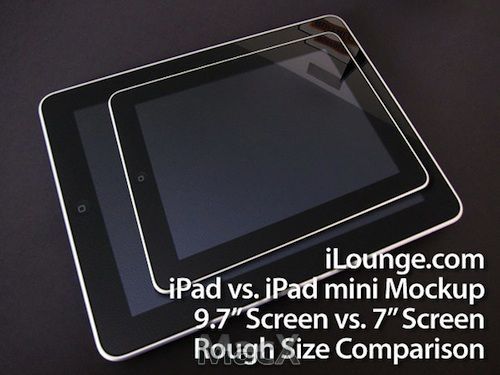
Imaginary 7 inch iPad
Athough Apple is leading the Consumer Tablet PC market, and sales of iPad are far above Android Tablet PC, there are still four reasons why Aplle should launch the smaller screen Tablet PC.
First, Smaller Tablet PC is more portable
The smaller size tablet PC with higher frequency of ultilization, can be used in more situations. For example, the Samsung 7 inch Galaxy Tab tablet PC can be carried with you, but iPad is inconvenient in carrying. When the users sit in the yard, or go to Starbucks, iPad can well meet your needs. But in the process of moving, 7 inch flat panel computer is more convenient. The tablet can be packed in your pants or jacket pocket, but iPad can't. Smaller size also makes weight lighter.
Second, Outstanding 7 inch Tablet PC has already been available
Although 7 inch Galaxy Tab brings much convenience, there are still some disadvantages compared with iPad. However, some better 7 inch Tablet PCs have been available such as bookstore Nook tablet PC and Amazon's Kindle Fire tablet PC. The two products are very popular in this Christmas season. Portability is one of advantages, but more important is the lower price. These 7 inch flat panel computers sell for $199 to $249. Although these tablets can only provide 80% functions of iPad, the price occupies only 40% of it. Maybe Aplle will not throw away the market to Bookstore and Amazon manufactures.
Third, iPod Touch has been less attractive than ever
Some people think that since iPod Tough exists, there is no necessary for Apple to launch the smaller iPad, but this is just one of the reasons that Apple should launch the smaller iPad. As Apple communicates with more and more Operators, consumers are purchasing iPhone more, leading the iPod Touch sales gradually slide down. Some Android mobile phone users may purchase iPod Touch as a supplement, but iPhone users will not do so. Recently, the investment put into iPod Touch is less and less, among the product line update items only increases the white version. This suggests that, as one product line, iPod Touch is gradually towards the end.
Fourth, Price of the smaller iPad can be reduced to the level of iPod Touch
If Apple eventually gave up iPod Touch, it will be lack of products whose price is from 199 to 399 dollars. Apple can launch the small size iPad, whose price is $199, to compete with Kindle Fire. Similar to iPod Touch and the current iPad, the $199 iPad can be the product of WiFi version unrelated to operators, and with 3G module version, the price will be improved. To those consumers, who wish to obtain iPad experience and think price of $499 is too high, 199 to $399 products will meet their needs. Industry insiders guess that, the price of smaller size iPad may be associated with iPod Touch, while the larger storage capacity will have the higher price. Although the launch of small size iPad is appropriate, it does not mean that the current 10 inch iPad is not good. However, the small size iPad has a living space. The best opportunity for Apple to launch the small size iPad will be in September, 2012, the traditional iPod conference. This will help Apple develop better the next Christmas market.
iPad Converter
Imaginary 7 inch iPad
Athough Apple is leading the Consumer Tablet PC market, and sales of iPad are far above Android Tablet PC, there are still four reasons why Aplle should launch the smaller screen Tablet PC.
First, Smaller Tablet PC is more portable
The smaller size tablet PC with higher frequency of ultilization, can be used in more situations. For example, the Samsung 7 inch Galaxy Tab tablet PC can be carried with you, but iPad is inconvenient in carrying. When the users sit in the yard, or go to Starbucks, iPad can well meet your needs. But in the process of moving, 7 inch flat panel computer is more convenient. The tablet can be packed in your pants or jacket pocket, but iPad can't. Smaller size also makes weight lighter.
Second, Outstanding 7 inch Tablet PC has already been available
Although 7 inch Galaxy Tab brings much convenience, there are still some disadvantages compared with iPad. However, some better 7 inch Tablet PCs have been available such as bookstore Nook tablet PC and Amazon's Kindle Fire tablet PC. The two products are very popular in this Christmas season. Portability is one of advantages, but more important is the lower price. These 7 inch flat panel computers sell for $199 to $249. Although these tablets can only provide 80% functions of iPad, the price occupies only 40% of it. Maybe Aplle will not throw away the market to Bookstore and Amazon manufactures.
Third, iPod Touch has been less attractive than ever
Some people think that since iPod Tough exists, there is no necessary for Apple to launch the smaller iPad, but this is just one of the reasons that Apple should launch the smaller iPad. As Apple communicates with more and more Operators, consumers are purchasing iPhone more, leading the iPod Touch sales gradually slide down. Some Android mobile phone users may purchase iPod Touch as a supplement, but iPhone users will not do so. Recently, the investment put into iPod Touch is less and less, among the product line update items only increases the white version. This suggests that, as one product line, iPod Touch is gradually towards the end.
Fourth, Price of the smaller iPad can be reduced to the level of iPod Touch
If Apple eventually gave up iPod Touch, it will be lack of products whose price is from 199 to 399 dollars. Apple can launch the small size iPad, whose price is $199, to compete with Kindle Fire. Similar to iPod Touch and the current iPad, the $199 iPad can be the product of WiFi version unrelated to operators, and with 3G module version, the price will be improved. To those consumers, who wish to obtain iPad experience and think price of $499 is too high, 199 to $399 products will meet their needs. Industry insiders guess that, the price of smaller size iPad may be associated with iPod Touch, while the larger storage capacity will have the higher price. Although the launch of small size iPad is appropriate, it does not mean that the current 10 inch iPad is not good. However, the small size iPad has a living space. The best opportunity for Apple to launch the small size iPad will be in September, 2012, the traditional iPod conference. This will help Apple develop better the next Christmas market.
iPad Converter
2011年12月17日星期六
Microsoft's New OneNote and Lync Apps for iPad, iPhone
On December 12, Microsoft released the new OneNote app for iPad and an updated app for other iOS devices like iPhone, iPod touch, etc. Meanwhile, Microsoft made available its Lync 2010 client app for Windows Phone, and the new Lync clients for iPhone, iPad, Android and Nokia Symbian have been submitted to their respective mobile app marketplaces and will be available as soon as they have been approved.
"Since the launch of OneNote for iPhone nearly a year ago, a recurring request from our customers has been for a version that can be used more easily on the iPad's larger screen," Microsoft said in a blog post. "We're happy to announce that today's new release of OneNote for iOS devices includes a version that's tailored for the iPad." Microsoft updated the app with better navigation, table viewing and performance. More significantly, Microsoft released a whole new version that fills up the greater real estate on an iPad screen. Previously, iPad users would have to use a blown-up version of the iPhone OneNote app, which didn't look very appealing and wasn't optimized for a larger device.
OneNote notebooks are stored via Microsoft SkyDrive. "Your own cloud-based SkyDrive account lets you easily sync all of your notebooks across all of your devices, so they're always up-to-date and accessible from virtually anywhere on your iPhone, your iPad, your Web browser, or your computer," Microsoft said. Today's 1.3 update provides support for the iPad and iPad 2. Other new features, which also apply to the iPhone, include: localization into several new languages and markets; tabbed user interface; quick note creation in the Unfiled Notes section; table rendering; improved Windows Live sign-in experience; the option to sync notebooks only over a Wi-Fi connection; and integrated upgrade option.
Lync, the Microsoft's successor to Office Communications Server, is the Microsoft's unified communications platform that the company launched a year ago. Lync provides enterprise instant-messaging, VOIP and conferencing. There is also a Microsoft-hosted version of Lync that is available as a standalone service and part of Office 365 that is known as Lync Online. According to the Microsoft, the new Lync mobile client allows instant messaging, call-related features and audio conferencing using a Lync ID, which is dependent on an organization having Lync 2010 Server installed. The mobile client must be provisioned by the Lync server administrator first, and that will enable users to download and begin using the various Lync 2010 mobile apps, a Microsoft unified communications team blog explained.
However, Apple devices must be running iOS 4.3 or higher to access OneNote 1.3, and users must sign up for a free Windows Live account. The app is free to download and users get up to 500 free notes. After that, it's $4.99 for unlimited use on the iPhone and $14.99 for unlimited use on the iPad. Meanwhile, if you were hoping for more official word today on some kind of Microsoft Office suite on the iPad, don't hold your breath. Microsoft still are not commenting on rumors that Office for the iPad will be out in some form in 2012.
DVD to iPhone Converter. iPad Transfer2011年12月15日星期四
Microsoft releases SkyDrive App for Windows phone and iPhone
Microsoft's love affair with iOS isn't over yet. It was OneNote and a “real soon now” commitment on its Lync unified-communications client for the iPad this Monday. Microsoft also announced this week that its Kinectimals game is available for the iPad and iPhone. On December 13, Microsoft made yet another Apple-focused announcement: An iOS version of SkyDrive for iPhone.
Users of Microsoft's SkyDrive cloud storage service now have another way to access and share their files – the newly released SkyDrive App for both Windows phone and iOS devices, which are intended to complement SkyDrive.com's existing mobile interface. "As devices proliferate, having a great experience on the Web is only one piece of a pretty complex puzzle," Microsoft's Mike Torres wrote. "People are choosing where to put their files based on how portable and accessible they are across the various devices they use, therefore, it's critical that we continue to extend the SkyDrive experience to the devices you use every day."
Microsoft's Mike Torres said: "Many still want the full SkyDrive experience from Windows phone, including tasks like browsing their entire SkyDrive, sharing links to folders or files, deleting files, and creating folders." The SkyDrive App allows you to view all of the files and folders in your SkyDrive and those that have been shared with you by others. You can view documents and pictures, create and delete folders, delete files, email links to files and folders (giving recipients either read-only or read-and-write permissions to the file), and download and upload pictures. Moving and renaming files and folders don’t appear to be possible on either platform, however. As a result, phones running Windows Phone 7.5 can now download the SkyDrive App from the Windows phone Marketplace and do just that. For those on iOS, the same app was also released in the App Store.
SkyDrive is a potential competitor in the mobile consumer space with Apple's iCloud, which is available for free with iOS 5. Microsoft's SkyDrive efforts appear to be part of its general market push into a world of connected devices that will increasingly be mobile. It also squares with the "three-screens and a cloud" vision laid out when Ray Ozzie was Microsoft's chief software architect. The idea is to synchronized data across devices. SkyDrive is already facilitating that, in part, by enabling single sign-on capabilities across devices.
Microsoft explained late last month that it has made sharing via SkyDrive more "app-centric." It already enables document collaborations via some of its Office Web Apps, although its "coauthoring" feature used with the Word Web App doesn't exactly work in real time. Other improvements made earlier this year to SkyDrive include simplifications to accessing folder directories and a speeded-up photo browsing experience, as well as the use of AJAX and HTML 5 technologies to improve the user experience. Microsoft has explained that some of the SkyDrive features it built earlier were just too complex, but it is listening to customer feedback and making improvements.
iPad Transfer, iPhone TransferBack-glances of iOS Development, iOS 1、2、3、4、5
On January 10, 2007, Steve Jobs demonstrated a new intelligent mobile phone---iPhone, as well as the iOS system, which has changed history.
At that time Windows Mobile、Palm OS、Symbian and BlackBerry OS were all active on the mobile stage.
The first generation of iPhone did not support 3G, didn't support the third-app, didn't support copy and paste text, didn't support multiple tasks, didn't support email attachments, didn't support MMS, Exchange, Office Editor and so on.
Now let us together make a five-year-review of iOS from the 2007 when iOS 1 and iPhone were born...
iOS 1

June, 2007---iOS 1.0---First generation of iPhone
Although it was not perfect, it brought much profound impact later
- The core of iOS user interface
- Mobile Safari browser
- A new form of " widescreen" iPod
- Google Map
- Visual voice mail
- ITunes synchronization
- Virtual keyboard
September, 2007 -- iOS 1.1 -- iPhone 1 / iPod touch 1
- iTunes Wi-Fi music store
- iPod touch compatible
January, 2008 -- iOS 1.1.3
- better positioning
- Set webpage shortcut icon on main screen
- Re-layout icon
- Multi point touch keyboard
iOS 2

iOS 2, from July, 2008, created a new era, i'm not wrong, just App Store.
At the beginning it took use of iTunes music users, and now becomes most popular program store, App Store created value for Apple and developers, and brought a full range of intelligent mobile phone experience.
July, 2008 -- iOS 2 -- iPhone 1, 3G; iPod touch 1
- local third party programs
- App Store
- Support Microsoft Exchange
- MobileMe
- Search contacts
September, 2008 -- iOS 2.1 -- iPhone 1, 3G iPod touch1, 2;
- Improve battery life and speed
- iTunes Genius playlist
- line repair
2008 November -- iOS 2.2 -- iPhone 1, 3G iPod touch1, 2;
- Google Street View
- Podcast Download
iOS 3

IOS 3.0 is an era when functions outbroke, iPhone began to support the 3G network, its lack of functions got a full complement, and added many local features, leting iPhone play more intelligently in life.
June, 2009 -- iOS 3 -- iPhone1, 3G, 3GS; iPod touch 1, 2
- cut, paste, copy
- Voice control
- MMS information
- Spotlight search
- push notification
- USB and Bluetooth connection
Lateral keyboard
- Find My iPhone
September, 2009 -- iOS 3.1 -- iPhone1, 3G, 3GS; iPod touch, 1, 2, 3
- Genius function
- ringtones download
- Remote locking
- Control through blue tooth speech
iOS 4

In June, 2010, the arrival of the iOS 4 brought more functions, Apple will always add the needs point by point to surprise us, for example the multi task switching, if lack this function now, will you hold on?
June, 2010 -- iOS 4 -- iPhone 3G, 3GS, 4; iPod touch 2, 3
- Multi task
- Folder
- FaceTime Contact
- Unified mail inbox
- Multi - thread message
- Retina HD display technology
- Support iAd advertising
iOS 5

Now iOS 5 is in front of your eyes, iPhone 4S Siri voice assistant, iMessage, notify the center and other new features that we are beginning to experience and the time is not so long, and iCloud cloud storage.
Do you feel the release conference is visible?
October, 2011 -- iOS 5 -- iPhone 3GS, 4, 4S iPad 1, 2; 3, 4; iPod touch
- Siri voice
- Notification Center
- free PC
- iTunes Wi-Fi synchronization
- iMessage
- iCloud
This article is posted by iPad Video Converter Club.
At that time Windows Mobile、Palm OS、Symbian and BlackBerry OS were all active on the mobile stage.
The first generation of iPhone did not support 3G, didn't support the third-app, didn't support copy and paste text, didn't support multiple tasks, didn't support email attachments, didn't support MMS, Exchange, Office Editor and so on.
Now let us together make a five-year-review of iOS from the 2007 when iOS 1 and iPhone were born...
iOS 1
June, 2007---iOS 1.0---First generation of iPhone
Although it was not perfect, it brought much profound impact later
- The core of iOS user interface
- Mobile Safari browser
- A new form of " widescreen" iPod
- Google Map
- Visual voice mail
- ITunes synchronization
- Virtual keyboard
September, 2007 -- iOS 1.1 -- iPhone 1 / iPod touch 1
- iTunes Wi-Fi music store
- iPod touch compatible
January, 2008 -- iOS 1.1.3
- better positioning
- Set webpage shortcut icon on main screen
- Re-layout icon
- Multi point touch keyboard
iOS 2
iOS 2, from July, 2008, created a new era, i'm not wrong, just App Store.
At the beginning it took use of iTunes music users, and now becomes most popular program store, App Store created value for Apple and developers, and brought a full range of intelligent mobile phone experience.
July, 2008 -- iOS 2 -- iPhone 1, 3G; iPod touch 1
- local third party programs
- App Store
- Support Microsoft Exchange
- MobileMe
- Search contacts
September, 2008 -- iOS 2.1 -- iPhone 1, 3G iPod touch1, 2;
- Improve battery life and speed
- iTunes Genius playlist
- line repair
2008 November -- iOS 2.2 -- iPhone 1, 3G iPod touch1, 2;
- Google Street View
- Podcast Download
iOS 3
IOS 3.0 is an era when functions outbroke, iPhone began to support the 3G network, its lack of functions got a full complement, and added many local features, leting iPhone play more intelligently in life.
June, 2009 -- iOS 3 -- iPhone1, 3G, 3GS; iPod touch 1, 2
- cut, paste, copy
- Voice control
- MMS information
- Spotlight search
- push notification
- USB and Bluetooth connection
Lateral keyboard
- Find My iPhone
September, 2009 -- iOS 3.1 -- iPhone1, 3G, 3GS; iPod touch, 1, 2, 3
- Genius function
- ringtones download
- Remote locking
- Control through blue tooth speech
iOS 4
In June, 2010, the arrival of the iOS 4 brought more functions, Apple will always add the needs point by point to surprise us, for example the multi task switching, if lack this function now, will you hold on?
June, 2010 -- iOS 4 -- iPhone 3G, 3GS, 4; iPod touch 2, 3
- Multi task
- Folder
- FaceTime Contact
- Unified mail inbox
- Multi - thread message
- Retina HD display technology
- Support iAd advertising
iOS 5
Now iOS 5 is in front of your eyes, iPhone 4S Siri voice assistant, iMessage, notify the center and other new features that we are beginning to experience and the time is not so long, and iCloud cloud storage.
Do you feel the release conference is visible?
October, 2011 -- iOS 5 -- iPhone 3GS, 4, 4S iPad 1, 2; 3, 4; iPod touch
- Siri voice
- Notification Center
- free PC
- iTunes Wi-Fi synchronization
- iMessage
- iCloud
This article is posted by iPad Video Converter Club.
2011年12月14日星期三
Four Major Attractions of The Newly-Launched Aiseesoft DVD Creator.
Through continuous innovation and the day and night's hard work of Aiseesoft Studio's engineers, Aiseesoft Studio has released DVD Creator to welcome the coming Christmas.
Other thighs aside, this DVD Creator can burn videos to nearly all DVD+-R/RW, DVD-RAM, DVD-5(4.5G) and DVD-9(8.5GB) discs. And the created DVD-format disc could be played perfect on most portable and home DVD player.
This is a victory.
There are four major attractions in this program and after you have a try by yourself, maybe you will be astonished.
First Attraction, With it, you can easily preserve your favorite videos like AVI, MPEG, DivX, DV, VOB, WMV, MP4, M2TS, MTS, etc. to DVD-format disc, and also it allows users to burn video to DVD folder and ISO files, which can be stored in local disk.
Second Attraction, Compared with other DVD Movie Creators or DVD Burners, Aiseesoft DVD Creator is more personalized. With it, you can first edit the video effect, such as brightness, saturation, contrast, hue and volume and also you can cut off any video segment and crop the video frame, etc. Thus, you can make your DVD as you wish not like the DVDs in the market that you can only watch them.
Third Attraction, In addition to Edit the video sources effect, you can Customize the DVD menu. There are many beautiful menu templates for users to choose, and certainly, you can prefer that there is no menu in your DVD, if you like the simple template.
After you have chosen the menu template, you can also select the menu frame and button style. Also you can edit the menu text content and define its font, size and color.
Moreover, this software enables you to attach your own background picture/music and opening film to the DVD menu.
Fourth Attraction, This DVD Creator allows users to choose the audio track for the DVD. Besides of the exciting audio track, you can also add your own audio track or background music to the DVD.
You can choose a language to sign the audio track you preferred, adjust the volume, and choose audio encoder/bitrate/channels. If the audio track and the video scenes do not match, you can adjust the audio latency to make the audio track sync with the image of video.
Certainly there are many other creative functions waiting for your discovery.
Please have a try by yourself: http://www.aiseesoft.com/dvd-creator/
Other thighs aside, this DVD Creator can burn videos to nearly all DVD+-R/RW, DVD-RAM, DVD-5(4.5G) and DVD-9(8.5GB) discs. And the created DVD-format disc could be played perfect on most portable and home DVD player.
This is a victory.
There are four major attractions in this program and after you have a try by yourself, maybe you will be astonished.
First Attraction, With it, you can easily preserve your favorite videos like AVI, MPEG, DivX, DV, VOB, WMV, MP4, M2TS, MTS, etc. to DVD-format disc, and also it allows users to burn video to DVD folder and ISO files, which can be stored in local disk.
Second Attraction, Compared with other DVD Movie Creators or DVD Burners, Aiseesoft DVD Creator is more personalized. With it, you can first edit the video effect, such as brightness, saturation, contrast, hue and volume and also you can cut off any video segment and crop the video frame, etc. Thus, you can make your DVD as you wish not like the DVDs in the market that you can only watch them.
Third Attraction, In addition to Edit the video sources effect, you can Customize the DVD menu. There are many beautiful menu templates for users to choose, and certainly, you can prefer that there is no menu in your DVD, if you like the simple template.
After you have chosen the menu template, you can also select the menu frame and button style. Also you can edit the menu text content and define its font, size and color.
Moreover, this software enables you to attach your own background picture/music and opening film to the DVD menu.
Fourth Attraction, This DVD Creator allows users to choose the audio track for the DVD. Besides of the exciting audio track, you can also add your own audio track or background music to the DVD.
You can choose a language to sign the audio track you preferred, adjust the volume, and choose audio encoder/bitrate/channels. If the audio track and the video scenes do not match, you can adjust the audio latency to make the audio track sync with the image of video.
Certainly there are many other creative functions waiting for your discovery.
Please have a try by yourself: http://www.aiseesoft.com/dvd-creator/
2011年12月11日星期日
How to convert video to iPad 2
With Aiseesoft iPad 2 Video Converter, users can enjoy any video files on iPad 2 through converting it to iPad 2 compatible video and audio formats. This iPad 2 Video Converter is able to convert most popular video formats to iPad 2. Also this software owns powerful video editing functions to help users customize video effect.
Step 1: Download iPad 2 Video Converter and install it
You could download the latest version of this iPad 2 Video Converter by clicking here. You can double-click the installation package to install it. After running this software, you can see the interface like this:
Step 2: Input source video file
This iPad 2 Video Converter supports most popular video formats. You can input any video file by clicking the "Add File" button.
Step 3: Customize video effect
Aiseesoft iPad 2 Video Converter provides users with powerful video editing functions. With it, users can conveniently trim video length, crop video frame, modify video effect, etc. All these settings can be finished in the "Edit" interface.
Step 4: Choose audio track and subtitle
This iPad 2 Video Converter will list all audio tracks and subtitles available on the source video file. You can choose your preferred one for the output iPad 2 file.
Step 5: Choose profile
Aiseesoft iPad 2 Video Converter can convert video to iPad 2 MPEG-4 video, iPad 2 H.264 video and iPad 2 H.264 720p video for TV. You can choose any one according to your need. And you can do some further settings by clicking the "Settings" button.
Then you can press the "Convert" button to start converting video to iPad 2.
Step 1: Download iPad 2 Video Converter and install it
You could download the latest version of this iPad 2 Video Converter by clicking here. You can double-click the installation package to install it. After running this software, you can see the interface like this:
Step 2: Input source video file
This iPad 2 Video Converter supports most popular video formats. You can input any video file by clicking the "Add File" button.
Step 3: Customize video effect
Aiseesoft iPad 2 Video Converter provides users with powerful video editing functions. With it, users can conveniently trim video length, crop video frame, modify video effect, etc. All these settings can be finished in the "Edit" interface.
Step 4: Choose audio track and subtitle
This iPad 2 Video Converter will list all audio tracks and subtitles available on the source video file. You can choose your preferred one for the output iPad 2 file.
Step 5: Choose profile
Aiseesoft iPad 2 Video Converter can convert video to iPad 2 MPEG-4 video, iPad 2 H.264 video and iPad 2 H.264 720p video for TV. You can choose any one according to your need. And you can do some further settings by clicking the "Settings" button.
Then you can press the "Convert" button to start converting video to iPad 2.
2011年12月9日星期五
Microsoft updates Xbox 360, adding more contents to enrich your life
Microsoft releases a new Xbox 360 dashboard update to all Xbox users in this week, and Xbox uses can enjoy much more contents apart from games. The Xbox console's various channels now headline the top of the screen, listing the familiar "games," "music" and "video" sections between the new Bing search feature and the console's settings page. A few of the channels have been renamed -- "My Xbox" is now "home" and a very Zune-esque "social" replaces "friends." Core content hasn't changed much, but the way you access it has, with yesterday's single-file tiles retired in favor of single page Metro layouts, packing more than twice as much information on screen as the previous Dashboard.
The contemporary update keeps the Metro, heavy on typography and flat squares and live tiles and swiping, the Metro lives in Xbox, Windows Phone 7 and the upcoming Windows 8, it's a fresh yet familiar take on UI. Metro looks so good and easy-to-use whether you already know how to use it or you've never used it before. With Metro on Xbox, Microsoft can elegantly pack more contents onto one screen. A horizontal menu details the various categories on your Xbox (Games, Video, Music, Apps, etc.) with each category getting its own hub organized neatly with independent tiles of content.
In addition, the Xbox companion application is powered by Microsoft’s Bing search engine. The search functionality allows you to search the entire Xbox Live catalog of TV shows, movies, music, games and apps on your Windows Phone device. Once you’ve searched a title, you can find out more information about it, and launch it on your Xbox from your handset, controlling it with the usual play, pause, rewind and fast forward functions we’re all used to. By bundling all digital subscriptions and content through the Xbox 360, Microsoft wants to make sure your gaming console is at the heart of your entertainment center. Xbox Live subscribers and subscribers of these digital services won't have access to much in the way of new content, but it will all be centralized in one location. Microsoft has also baked in deeper voice control of the console for consumers using its Kinect sensor. The Kinect is better known as motion-controller that gives gamers the ability to use gestures to play games. But Kinect also has a microphone array in it. When Kinect debuted last year, gamers could use their voice for some limited voice-controlled navigation.
In a word, the move is part of a growing effort by media companies to bring some 21st-century pizzazz to the experience of navigating and watching television, a medium that is largely watched using traditional remote controls and set-top boxes that have changed little in the past 10 years. Xboxes are already 57 million households worldwide, so the decision to update such a gigantic installed base is a shrewd move on Microsoft’s part. Nonetheless, it remains to be seen whether the Xbox can juice the Windows Phone platform, which could use a serious boost in adoption.
Microsoft will open Windows store for Metro-style Windows 8 App in February
Microsoft on Tuesday brought its Windows 8 road show to San Francisco, where the company previewed its upcoming Windows Store for app developers and media. They will open the online marketplace for Metro-style Windows 8 application in late February 2012. The key ingredients of the Windows Store are easy app discovery from within and without the online marketplace, built-in app trials with quick upgrade paths, support for both x86 and ARM-based hardware, and a flexible business model, Microsoft's Antoine Leblond said.
With Apple's Mac App Store and iTunes Store already operational and selling both computer and tablet applications, Microsoft is keen to highlight the differences and promises to make an application store that was more flexible, more transparent, and ultimately more lucrative for developers than Apple's. The Windows Store will make it easy for Windows customers to find, try and buy useful, high-quality apps from practically anywhere in the world. With code-named "Windows 8" and the Windows Store, developers can enjoy a built-in distribution and update mechanism for their apps. Built using HTML5 and JavaScript, the Windows Store is a fast, fluid, full-screen Metro-style app taking advantage of the Metro-style design principles inspired in Windows 8. Easy to build for, submit to and sell through, the Windows Store is designed with app discoverability and visibility in mind. The Windows Store will open its virtual doors to consumers and begin allowing for submission of free apps for Windows 8 Beta in late February next year.
The Windows Store will support both free and paid applications, with paid applications ranging from $1.49 to $999. As with Microsoft's Windows Phone Marketplace, developers can offer free trials, with integrated support for converting trials to full versions. Microsoft will provide its own advertising and in-app purchase infrastructure, but these will be strictly optional, if a developer wants to use a different ad network, or its own subscription and billing system, that's not a problem. With a standard validation process that developers can use even before they make their submission and an online tracker that tells them which phase their application is in and how long they can expect the process to take. But money is, for many developers, the most important feature of any online store. The Windows Store will take a 30 percent cut of application sales, just like Apple's store.
The Windows Store follows the path of Apple's Mac App Store, a software marketplace that's built into Mac OS X. That's provided a way for customers to quickly download both free and paid applications for their computers. Microsoft will offer the app marketplace around the world. Leblond said it will support more than 100 languages in 231 different markets. With the dominant operating system software as a lure, the Windows Store could evolve into a meaningful revenue generator for the company, which rang up just shy of $70 billion in the last fiscal year.
Total Video Converter | Video Converter for Mac2011年12月8日星期四
Google Chairman Eric Schmidt said: “Android has been leading Apple iPhone”.
Google Cairman Eric Schmidt said today, in intelligent mobile phone market, Android has already been ahead of the Apple iPhone.


Google Cairman Eric Schmidt
Today Schmidt at the LeWeb meeting in Paris said: "Android is now ahead of the iPhone." After Schmidt published the speech, that room is filled with the iPhone, iPad and Mac. Having heard Schmidt's remark, the audience suddenly fell into silent for a moment. Maybe they doubt on Schmidt's speech.
Schmidt then gives his own criteria:" huge volume, high performance Android 4.0, lower price, as well as many mobile phone manufacturers’ support."
Industry insiders said, in the intelligent mobile phone market, Android is developing rapidly. But compared with Apple iOS, the obvious disadvantage is Android has not become the preferred platform for developers. Notebook application developer Evernote today only released a new application Hello for iPhone.
Social News reader Flipboard has already launched iPhone application. Flipboard CEO Mike McCue said:" We have been concerned about the iPhone. As with the Android version, we are still waiting."
Schmidt believed that, with the Android 4.0 and huge volume, Android will win. Schmidt said: "in the end, application developers will be affected by the volume, and Google's open strategy will promote the shipment growth. So many manufacturers promote Android mobile phones to the world, whether they like it or not, people will support this platform, even considering it as the preferred platform."
Article from iPhone SMS Backup Club
Google Cairman Eric Schmidt
Today Schmidt at the LeWeb meeting in Paris said: "Android is now ahead of the iPhone." After Schmidt published the speech, that room is filled with the iPhone, iPad and Mac. Having heard Schmidt's remark, the audience suddenly fell into silent for a moment. Maybe they doubt on Schmidt's speech.
Schmidt then gives his own criteria:" huge volume, high performance Android 4.0, lower price, as well as many mobile phone manufacturers’ support."
Industry insiders said, in the intelligent mobile phone market, Android is developing rapidly. But compared with Apple iOS, the obvious disadvantage is Android has not become the preferred platform for developers. Notebook application developer Evernote today only released a new application Hello for iPhone.
Social News reader Flipboard has already launched iPhone application. Flipboard CEO Mike McCue said:" We have been concerned about the iPhone. As with the Android version, we are still waiting."
Schmidt believed that, with the Android 4.0 and huge volume, Android will win. Schmidt said: "in the end, application developers will be affected by the volume, and Google's open strategy will promote the shipment growth. So many manufacturers promote Android mobile phones to the world, whether they like it or not, people will support this platform, even considering it as the preferred platform."
Article from iPhone SMS Backup Club
2011年12月6日星期二
Acer and Lenovo will release quad-core Tegra 3 tablets early next year
Rumors have surfaced that Acer and Lenovo are lining up Android 4.0(Ice Cream Sandwich) tablets with NVIDIA's quad-core Tegra 3 GPU for launch in the first quarter of 2012. The companies haven’t specified what models they’re going to launch, while the devices are designed to compete with Asus's forth coming Eee Pad Transformer Prime, a hybrid tablet that also packs a Tegra 3 processor. Digitimes suggested that Acer’s Iconia Tabs, the upcoming Lenovo tablet, and a future Samsung Galaxy Tab would all be unveiled at CES or Mobile World Congress next year.
Tablet and Smartphone zealots have been salivating over the quad-core ARM Cortex A9 Tegra 3 for some time, and the processor is at the tipping point for appearance in real, purchasable devices. The Transformer Prime's Tegra 3 is clocked at 1.3GHz, though it is shipping as Android 4-capable, there's a window for Acer or Lenovo to slip in as the first tablet to market with that OS.
The new quad-core tablets should be much more powerful than their dual-core predecessors, while the latest generation may not much better against Apple’s upcoming iPad 3, sources say, as they potentially wouldn’t be “fundamentally different than their predecessors and would be trading mostly on their speed”. The sources also speculate that “since non-Apple players’ machines have no advantage to compete against Amazon or Apple’s tablet PC devices, non-Apple players will together account for only 10-15% of the total tablet PC market.” That is to say, the iPad is indeed still king.
It is reported that you'll be able to snag a nifty Acer and Lenovo’s Tablet with a quad-core GPU for between $459 and $599 in 2012. Since neither Acer nor Lenovo have a direct advantage over Apple or Amazon's tablet devices, the mathematical formulas prove that owning a reasonably priced tablet with a quad-core GPU does make you the coolest kid on the block. This would put them essentially in direct competition with the iPad.
2011年12月5日星期一
How to Rip DVD and Convert Video for Your New iPhone 4
With the release of iPhone 4, Aiseesoft Studio also releases corresponding converting software for iPhone fans. The main products are Aiseesoft DVD to iPhone 4 Converter and Aiseesoft iPhone 4 Movie Converter. Aiseesoft DVD to iPhone 4 Converter can convert DVD to iPhone 4 easily and fast. Aiseesoft iPhone 4 Movie Converter can convert MPG, MPEG, MPEG 2, VOB, DAT, MP4, M4V, TS, RM, RMVB, WMV, ASF, MKV, 3GP, 3G2, FLV, SWF, MPV, MOD, TOD, QT, MOV, DV, DIF, MJPG, MJPEG, HD video, AVI to iPhone 4. So why do you always buy movies and songs from iTunes with extra money? It can help you make use of your resources.
The software is very easy in use. You just need download, install and run the trial version.
The product is multifunctional. It can trim, crop, edit video effect, merge, add text and image watermark, select audio track and subtitle, adjust video settings and snapshot.
Moreover, there are other products relevant to iPhone 4 such as Aiseesoft Blu-ray to iPhone 4 Ripper, Aiseesoft iPhone 4 Ringtone Maker and Aiseesoft iPhone 4 Transfer. If you are interested, you can have a try.
If you are a Mac user, you can also enjoy them.
The software is very easy in use. You just need download, install and run the trial version.
The product is multifunctional. It can trim, crop, edit video effect, merge, add text and image watermark, select audio track and subtitle, adjust video settings and snapshot.
Moreover, there are other products relevant to iPhone 4 such as Aiseesoft Blu-ray to iPhone 4 Ripper, Aiseesoft iPhone 4 Ringtone Maker and Aiseesoft iPhone 4 Transfer. If you are interested, you can have a try.
If you are a Mac user, you can also enjoy them.
2011年12月4日星期日
DVD to iPad Converter Assist You to Enjoy DVD on iPad Freely!
With the appearance of the iPad, many types of video converters for iPad, like iPad video converter and iPad transfer have sprung up. Have you ever tried one of them? Whether or not, it is definite that these tools are surely useful to convert general video to iPad compatible formats. However, if you find a wonderful DVD video and want to watch it on your iPad while iPad can't play it directly, what should you do? Aiseesoft DVD to iPad Converter is specially designed to convert DVD files to iPad.
DVD to iPad Converter, the best and most powerful DVD to iPad converter, is able to rip any DVD file to almost all popular video formats including MPEG-4, H.264/MPEG-4 AVC, MOV, and M4V supported by iPad. In addition, this versatile software allows you to extract audio formats, such as AAC, MP3, WAV, AIFF, M4A, from DVD file.
In addition, this DVD to iPad Converter also brings you rich editing functions. You can trim video length, crop video play region, set video parameters, add watermark, etc. Moreover, you can choose your preferable audio track and subtitles or get some lovely pictures using the snapshot function. Also, you can merge several DVD pieces together and output them in a single file.
Furthermore, Aiseesoft DVD to iPad Converter for Mac plays the same role for Mac users. With DVD to iPad Converter software on hand, you can enjoy your favorite DVD video not only on your DVD player but also with your iPad conveniently. In a word, this DVD to iPad Converter should be your best choice when you want to enjoy your DVD movies in most efficient way.
Price and Availability
DVD to iPad Converter is now priced at $ 29.00
System Requirements
OS: Windows NT4/2000/2003/XP, Windows Vista and Windows 7
Requirements: 800MHz Intel or AMD CPU, or above; 512MB RAM or more
2011年12月3日星期六
The Competition of Indoor Navigation
I believe most of you have the same experience that I have. When you fist step in a new building, airport or school, you will feel loss and do not know what to do first and where to go. For example, you are in a hospital. It is difficult for you to find the place you want to go. Many hospital use a not that effective way to solve this problem, of course, it does not work at most of the time. They just set different kinds of sign post or just use different colors to guide people. However, now we have a really nice way to solve this problem, using intelligent map system in mobile phone. It makes it's easy to find some places in a building and other indoor places.
In the latest Android map, it includes US IKEA and Macy's and other 18 airport's detailed layout. Almost at the same time, Nokia announced they will release indoor map suing Bluetooth 4.0. Although use two totally different technology, we can smell that the war of indoor map is already begin.
For a long time, Bluetooth has a poor reputation. It maybe because that the headphone looks not like a human or something else. It makes people feel weird. However, Bluetooth is actually a really nice technology: powerful, simple, cheap. And it will be much more smart after the release of Bluetooth 4.0. Nokia's Location Extension Protocol uses the connection of locator transmitter on the ceiling and Bluetooth 4.0. And triangulation method that is similar to GPS. Through this way, your mobile phone can find the place you want to go accurately. It is said that the degree of precision is less than 8 inches.
Nokia has spent over one billion euros and hope this breakthrough technology will bring superority in the competiton of indoor map. They have also discovered the different application of this tech, from game to indoor navigation. Nokia is now trying their best to persuade Bluetooth SIG to make one uniform standard and hope this kind of mobile phone can come out into market in 2013.
Just like that if there is no specific map, GPS can not work, the indoor navigation system can not work without a detailed architectural and structural drawings. Now Google allows uses to upload or add architectural and structural drawings to Google Maps as they do the same to SketchUp. This is a simple process, users just need upload the picture of the floor's layout and then connect with satellite images of Google Maps. Through this way, Google not only gets many users' support, uploading indoor maps data day and night, they also uses the data for other users, such as services based on location and ads based on location.
What I have said above is not considering the crime, privacy and other safe question. People are now really sensitive to Google Street View. I believe this kind of indoor map data will bring bigger controversy. In conclusion, we need indoor navigation when we are in a strange building to find places fast. However, we need to use it carefully. Hope Google and Nokia will solve these problems and provide us indoor navigation one day.
DVD to iPod Converter | DVD to iPhone Converter2011年12月1日星期四
How to Rip DVD to iPad 2?
Enjoying DVD movie on iPad 2 would be a tough task as the iPad 2 cannot play DVD. However, with Aiseesoft DVD to iPad 2 Converter, users can conveniently enjoy any DVD movie on your iPad 2. This DVD to iPad 2 Converter is professional DVD to iPad 2 Ripper to rip any DVD to iPad 2 video and audio formats with perfect output quality and amazing converting speed.
First, you need to download the installation package of DVD to iPad 2 Converter and install it. Then you can see the interface as below.

Step 1: Load DVD
You can input any DVD disc, DVD folder, or DVD IFO file to this DVD to iPad 2 Converter.
Step 2: Edit video effect
If you are not satisfied with the original DVD movie effect, you can customize it with the built-in video editing features. It enables users to trim video length, crop video playing area, adjust video aspect ratio, modify video brightness, saturation and contrast, etc. You can click the relevant button to do all these editing.
Step 3: Choose audio track and subtitle
Usually, the DVD movie has more than one audio track and subtitle. You can choose your preferred one with this DVD to iPad 2 Converter.
Step 4: Adjust output settings
With this DVD to iPad 2 Ripper, you can adjust Video Encoder, Frame Rate, Video Bitrate, Resolution, Audio Encoder, Sample Rate, Channels, and Audio Bitrate. Also you can input your own solution.
Step 5: Choose output profile
Aiseesoft DVD to iPad 2 Converter can rip DVD to abundant of output formats. You need to choose one from the profile drop-down list according to your need. Then you can press the "Convert" button to start ripping DVD to iPad 2.
First, you need to download the installation package of DVD to iPad 2 Converter and install it. Then you can see the interface as below.
Step 1: Load DVD
You can input any DVD disc, DVD folder, or DVD IFO file to this DVD to iPad 2 Converter.
Step 2: Edit video effect
If you are not satisfied with the original DVD movie effect, you can customize it with the built-in video editing features. It enables users to trim video length, crop video playing area, adjust video aspect ratio, modify video brightness, saturation and contrast, etc. You can click the relevant button to do all these editing.
Step 3: Choose audio track and subtitle
Usually, the DVD movie has more than one audio track and subtitle. You can choose your preferred one with this DVD to iPad 2 Converter.
Step 4: Adjust output settings
With this DVD to iPad 2 Ripper, you can adjust Video Encoder, Frame Rate, Video Bitrate, Resolution, Audio Encoder, Sample Rate, Channels, and Audio Bitrate. Also you can input your own solution.
Step 5: Choose output profile
Aiseesoft DVD to iPad 2 Converter can rip DVD to abundant of output formats. You need to choose one from the profile drop-down list according to your need. Then you can press the "Convert" button to start ripping DVD to iPad 2.
2011年11月30日星期三
DVD to iPad Converter Assist You to Enjoy DVD on iPad Freely!
With the appearance of the iPad, many types of video converters for iPad, like iPad video converter and iPad transfer have sprung up. Have you ever tried one of them? Whether or not, it is definite that these tools are surely useful to convert general video to iPad compatible formats. However, if you find a wonderful DVD video and want to watch it on your iPad while iPad can't play it directly, what should you do? Aiseesoft DVD to iPad Converter is specially designed to convert DVD files to iPad.
DVD to iPad Converter, the best and most powerful DVD to iPad converter, is able to rip any DVD file to almost all popular video formats including MPEG-4, H.264/MPEG-4 AVC, MOV, and M4V supported by iPad. In addition, this versatile software allows you to extract audio formats, such as AAC, MP3, WAV, AIFF, M4A, from DVD file.
In addition, this DVD to iPad Converter also brings you rich editing functions. You can trim video length, crop video play region, set video parameters, add watermark, etc. Moreover, you can choose your preferable audio track and subtitles or get some lovely pictures using the snapshot function. Also, you can merge several DVD pieces together and output them in a single file.
Furthermore, Aiseesoft DVD to iPad Converter for Mac plays the same role for Mac users. With DVD to iPad Converter software on hand, you can enjoy your favorite DVD video not only on your DVD player but also with your iPad conveniently. In a word, this DVD to iPad Converter should be your best choice when you want to enjoy your DVD movies in most efficient way.
Price and Availability
DVD to iPad Converter is now priced at $ 29.00
System Requirements
OS: Windows NT4/2000/2003/XP, Windows Vista and Windows 7
Requirements: 800MHz Intel or AMD CPU, or above; 512MB RAM or more
2011年11月28日星期一
How to convert mts/m2ts/ts video and put them into iPod?
As people have higher requirements about the quality of videos, more and more HD videos are emerging. And we come across a large number of HD videos in our daily life. Nevertheless, at the same time, these videos bring people many format troubles. Many people complain about the HD videos and the relevant converting issue, such as, what is HD, MTS format? Why do many people choose that format? How to convert the MTS, M2TS, and TS into the mp4 mpeg, mp3, etc? How to put the MTS and HD formats into iPod and iPhone?
Therefore, it is really necessary to read the following article that will answer all your questions, solve your problems. Most importantly, an ideal method will be offered to you.
High-definition video or HD video refers to any video system of higher resolution than standard-definition (SD) videos, and most commonly involves display resolutions of 1280×720 pixels (720p) or 1920×1080 pixels (1080i/1080p). By using the HD Camcorder, such as, Canon HR10 Camcorder, JVC Everio GZHD7 , Sony HDR-HC1 MiniDV, people can get extremely high quality videos. As the video you record on your camcorder is MTS, TS, M2TS or other HD video format which can not be accepted by some popular portable players, so you have to convert them into normal video format to edit. Here I am will willing to share with you
how to convert MTS, TS, M2TS video to normal video formats. The following are the excellent tools.
MTS Converter
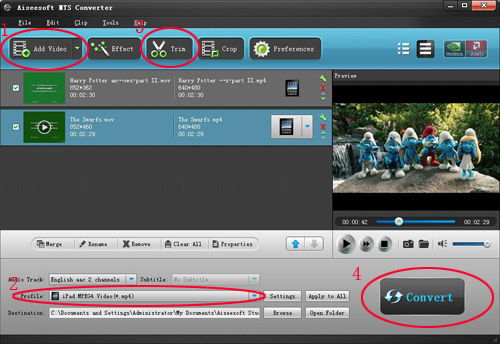
Steps:
Step 1: Load Video
Click “Add File” to load the video that you want.
Step 2: Choose Your Output Profile and Settings
From “Profile” drop-down list you can choose your output profile according to your need.
For example, if you have a iPod and you want to convert video for it, you need to choose “iPod” from the profile list and then it also provides the second chance to specify your iPod generation.
Step 3: Video Editing
This powerful MTS Converter allows you to do many video editing.
Step 4: Conversion
After you have done all the steps above you can click “Start” button to start your conversion.
The excellent software with the similar function are :
M2TS Converter
HD Video Converter.
Well, if , you also want to put the transferred videos from your iPod to your computer or to your friend’s iPod , the iPod Transfer is the best choice for you . It can easily transfer data between my iPod and iPhone, backup iPod data in your computer and put songs and videos from your computer to iPod/iPhone without iTunes.
How to transfer songs and videos from iPod to your computer, from computer to iPod and from iPod to iPod.
Click “Computer to iPod” button, it will allow you to transfer songs and videos from your computer to iPod easily.
Click “iPod to Computer” button, it will allow you to backup your songs and videos from iPod to your computer.
Click “iPod to iPod” button, it will allow you to transfer songs and videos from one iPod to another iPod dirrectly.
Therefore, it is really necessary to read the following article that will answer all your questions, solve your problems. Most importantly, an ideal method will be offered to you.
High-definition video or HD video refers to any video system of higher resolution than standard-definition (SD) videos, and most commonly involves display resolutions of 1280×720 pixels (720p) or 1920×1080 pixels (1080i/1080p). By using the HD Camcorder, such as, Canon HR10 Camcorder, JVC Everio GZHD7 , Sony HDR-HC1 MiniDV, people can get extremely high quality videos. As the video you record on your camcorder is MTS, TS, M2TS or other HD video format which can not be accepted by some popular portable players, so you have to convert them into normal video format to edit. Here I am will willing to share with you
how to convert MTS, TS, M2TS video to normal video formats. The following are the excellent tools.
MTS Converter
Steps:
Step 1: Load Video
Click “Add File” to load the video that you want.
Step 2: Choose Your Output Profile and Settings
From “Profile” drop-down list you can choose your output profile according to your need.
For example, if you have a iPod and you want to convert video for it, you need to choose “iPod” from the profile list and then it also provides the second chance to specify your iPod generation.
Step 3: Video Editing
This powerful MTS Converter allows you to do many video editing.
Step 4: Conversion
After you have done all the steps above you can click “Start” button to start your conversion.
The excellent software with the similar function are :
M2TS Converter
HD Video Converter.
Well, if , you also want to put the transferred videos from your iPod to your computer or to your friend’s iPod , the iPod Transfer is the best choice for you . It can easily transfer data between my iPod and iPhone, backup iPod data in your computer and put songs and videos from your computer to iPod/iPhone without iTunes.
How to transfer songs and videos from iPod to your computer, from computer to iPod and from iPod to iPod.
Click “Computer to iPod” button, it will allow you to transfer songs and videos from your computer to iPod easily.
Click “iPod to Computer” button, it will allow you to backup your songs and videos from iPod to your computer.
Click “iPod to iPod” button, it will allow you to transfer songs and videos from one iPod to another iPod dirrectly.
2011年11月27日星期日
How to create iPhone ringtone with Aiseesoft iPhone Ringtone Maker
You bought an iPhone and love all its features, but wish you didn't have to pay for your songs twice to get a ringtone. (We know that iPhone, iPhone 3G Ringtones use the file extension .M4R. And the users must pay $2 for a piece of song through Apple iTunes store). There are plenty of songs in your music library, but no way to make ringtones from any of them. Rihgt?
Actually, with a little bit of trickery (nothing illegal) you can create ringtones from any one of your non-DRM songs.
This works on both Mac and Windows PCs.
Window Users
You can create free iPhone Ringtones by yourself with Aiseesoft iPhone Ringtone Maker.
You can take the following step-by-step instructions to start.
Step 0: Download and install Aiseesoft iPhone Ringtone Maker. After a short while, you can see the following interface:
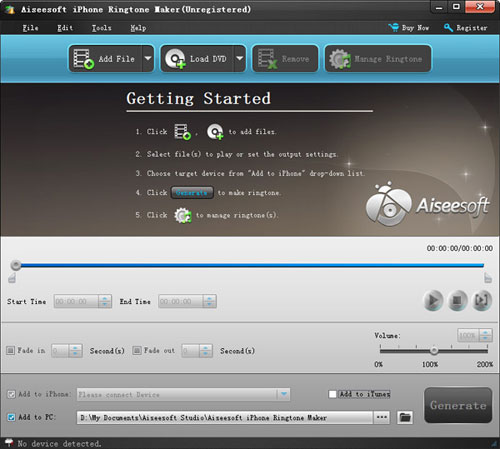
Step 1: Click “Browse” on the right side of "Input File" to import the file that you want to make ringtone from it.
Step 2: Play it and listen the music to find the segment that you want to use it as ringtone. Then drag and click the start & end slider to set your wanted segment, or type the start & end time in the corresponding text box directly to get the exact segment. You also can pre-listen the converted audio before generate.
Step 3: Click “Browse” on the right side of "Local Output Folder" to choose the output destination.
Step 4: Check "Export to iPhone" option, the converted ringtone will be load to your iPhone directly.
Step 5: After all the settings are finished, click “Generate” to begin making your own iPhone ringtone.
Key function
● Convert any video to iPhone ringtone M4R
● Create iPhone ringtone from any audio files
● Get any clips from video and audio
● Edit Added iPhone ringtones
Using Aiseesoft iPhone Ringtone Maker, you are free to edit the added iPhone ringtone by removing it or renaming it directly.
For Mac Userd, please go to Aiseesoft
iPhone Ringtone Maker for Mac
Actually, with a little bit of trickery (nothing illegal) you can create ringtones from any one of your non-DRM songs.
This works on both Mac and Windows PCs.
Window Users
You can create free iPhone Ringtones by yourself with Aiseesoft iPhone Ringtone Maker.
You can take the following step-by-step instructions to start.
Step 0: Download and install Aiseesoft iPhone Ringtone Maker. After a short while, you can see the following interface:
Step 1: Click “Browse” on the right side of "Input File" to import the file that you want to make ringtone from it.
Step 2: Play it and listen the music to find the segment that you want to use it as ringtone. Then drag and click the start & end slider to set your wanted segment, or type the start & end time in the corresponding text box directly to get the exact segment. You also can pre-listen the converted audio before generate.
Step 3: Click “Browse” on the right side of "Local Output Folder" to choose the output destination.
Step 4: Check "Export to iPhone" option, the converted ringtone will be load to your iPhone directly.
Step 5: After all the settings are finished, click “Generate” to begin making your own iPhone ringtone.
Key function
● Convert any video to iPhone ringtone M4R
● Create iPhone ringtone from any audio files
● Get any clips from video and audio
● Edit Added iPhone ringtones
Using Aiseesoft iPhone Ringtone Maker, you are free to edit the added iPhone ringtone by removing it or renaming it directly.
For Mac Userd, please go to Aiseesoft
iPhone Ringtone Maker for Mac
2011年11月25日星期五
How to rip DVD, convert video, transfer iPod music and make iPhone ringtone for Windows/Mac
It includes 4 parts:
Part 1. How to rip DVD to iPod/iPhone/Sansa/PSP/Zune and other MP4 and MP3 Players
Part 2. How to convert all video to MP4, AVI, FLV, 3GP, WMV, MOV, MPG, RM, RMVB, MKV, VOB…
Part 3. How to transfer music from iPod to computer, computer to iPod, iPod to iPod
Part 4. How to make your own iPhone ringtone for free
Believe or not, to do the things above what you need is download Aiseesoft DVD Software Toolkit and few clicks.
Part 1. How to rip DVD to iPod/iPhone/Sansa/PSP/Zune and other MP4 and MP3 Players.
Step 1. Click “DVD Ripper” on the main interface to run Aiseesoft DVD Ripper.
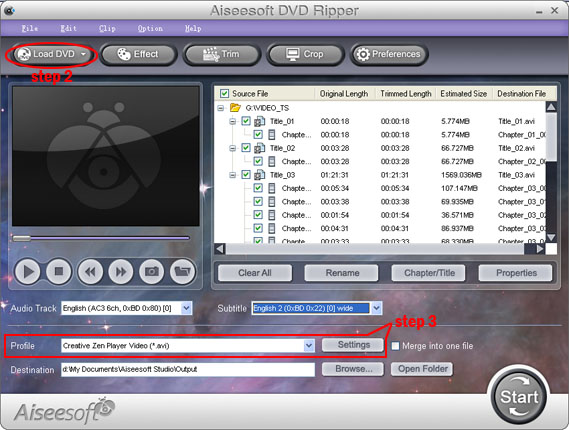
Step 2. Open your DVD Drive and put your DVD in it, then click “Load DVD” and choose “Load DVD” to load your DVD into this best DVD ripper.
Step 3. Choose your output format from the “profile” drop-down list. This best DVD ripper provides you so many formats that out of your expectation, such as “iPod video MPEG 4 (*.mp4)”, “iPhone 3G MOV 640*480 (*.mov)” and so on.
After you choose your output format, you can adjust your output video’s settings, such as “Resolution”, “Frame Rate”, “Bitrate”, “Sample Rate” and so on.
Click “Start” now to begin your conversion and you will get your video soon.
To make your output movie more enjoyable you can do some editings to it through this best DVD ripper. You can choose a part of your movie to convert (trim), remove the black edges of your DVD movie (crop) and also adjust the effect (effect) and select subtitle and audio track.
Part 2. How to convert all video to MP4, AVI, FLV, 3GP, WMV, MOV, MPG, RM, RMVB, MKV, VOB…
Step 1. Click “Total Video Converter” on the main interface to run Aiseesoft Total Video Converter
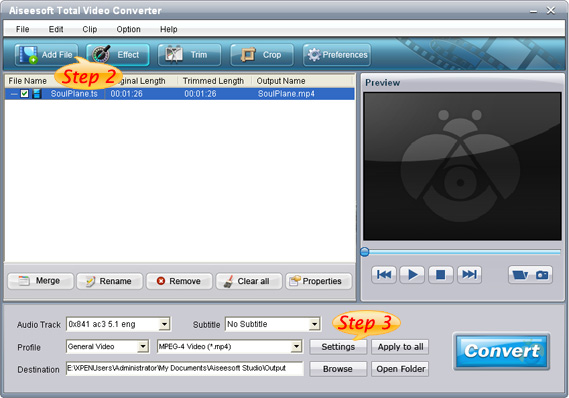
Step 2. Click “Add File” to load the video you want to convert.
Step 3. Choose output format by clicking “profile” and customize your own output video by
clicking “settings” to adjust the Resolution, Frame Rate, Bitrate and so on.
Before you click “Start” to begin your conversion, you can do some editing works, such as pick up a part of your video to convert(trim), choose your own play region(crop) and put two or more files into one.(merge into one file).
OK, now you can begin your conversion
Part 3. How to transfer your songs and videos bewteen iPod and computer/iPod
First, Click “iPod Transfer” to run Aiseesoft iPod Transfer
Click “Computer to iPod” button, it will allow you to transfer songs and videos from your computer to iPod easily.
Click “iPod to Computer” button, it will allow you to backup your songs and videos from iPod to your computer.
Click “iPod to iPod” button, it will allow you to transfer songs and videos from one iPod to another iPod dirrectly.
Part 4. How to make your own iPhone ringtone for free
Download Aiseesoft iPhone Ringtone Maker
Step 1: Click “Browse” on the right side of "Input File" to import the file that you want to make ringtone from it.
Step 2: Play it and listen the music to find the segment that you want to use it as ringtone. Then drag and click the start & end slider to set your wanted segment, or type the start & end time in the corresponding text box directly to get the exact segment. You also can pre-listen the converted audio before generate.
Step 3: Click “Browse” on the right side of "Local Output Folder" to choose the output destination.
Step 4: Check "Export to iPhone" option, the converted ringtone will be load to your iPhone directly.
Step 5: After all the settings are finished, click “Generate” to begin making your own iPhone ringtone.
If you are a Mac user, I recommend you Aiseesoft DVD Software Toolkit for Mac
it has the same functions as the windows one. You can use it easy rip your DVD, convert your videos, transfer your iPod songs and videos bewteen iPod and your Mac and also make your own ringtone.
Part 1. How to rip DVD to iPod/iPhone/Sansa/PSP/Zune and other MP4 and MP3 Players
Part 2. How to convert all video to MP4, AVI, FLV, 3GP, WMV, MOV, MPG, RM, RMVB, MKV, VOB…
Part 3. How to transfer music from iPod to computer, computer to iPod, iPod to iPod
Part 4. How to make your own iPhone ringtone for free
Believe or not, to do the things above what you need is download Aiseesoft DVD Software Toolkit and few clicks.
Part 1. How to rip DVD to iPod/iPhone/Sansa/PSP/Zune and other MP4 and MP3 Players.
Step 1. Click “DVD Ripper” on the main interface to run Aiseesoft DVD Ripper.
Step 2. Open your DVD Drive and put your DVD in it, then click “Load DVD” and choose “Load DVD” to load your DVD into this best DVD ripper.
Step 3. Choose your output format from the “profile” drop-down list. This best DVD ripper provides you so many formats that out of your expectation, such as “iPod video MPEG 4 (*.mp4)”, “iPhone 3G MOV 640*480 (*.mov)” and so on.
After you choose your output format, you can adjust your output video’s settings, such as “Resolution”, “Frame Rate”, “Bitrate”, “Sample Rate” and so on.
Click “Start” now to begin your conversion and you will get your video soon.
To make your output movie more enjoyable you can do some editings to it through this best DVD ripper. You can choose a part of your movie to convert (trim), remove the black edges of your DVD movie (crop) and also adjust the effect (effect) and select subtitle and audio track.
Part 2. How to convert all video to MP4, AVI, FLV, 3GP, WMV, MOV, MPG, RM, RMVB, MKV, VOB…
Step 1. Click “Total Video Converter” on the main interface to run Aiseesoft Total Video Converter
Step 2. Click “Add File” to load the video you want to convert.
Step 3. Choose output format by clicking “profile” and customize your own output video by
clicking “settings” to adjust the Resolution, Frame Rate, Bitrate and so on.
Before you click “Start” to begin your conversion, you can do some editing works, such as pick up a part of your video to convert(trim), choose your own play region(crop) and put two or more files into one.(merge into one file).
OK, now you can begin your conversion
Part 3. How to transfer your songs and videos bewteen iPod and computer/iPod
First, Click “iPod Transfer” to run Aiseesoft iPod Transfer
Click “Computer to iPod” button, it will allow you to transfer songs and videos from your computer to iPod easily.
Click “iPod to Computer” button, it will allow you to backup your songs and videos from iPod to your computer.
Click “iPod to iPod” button, it will allow you to transfer songs and videos from one iPod to another iPod dirrectly.
Part 4. How to make your own iPhone ringtone for free
Download Aiseesoft iPhone Ringtone Maker
Step 1: Click “Browse” on the right side of "Input File" to import the file that you want to make ringtone from it.
Step 2: Play it and listen the music to find the segment that you want to use it as ringtone. Then drag and click the start & end slider to set your wanted segment, or type the start & end time in the corresponding text box directly to get the exact segment. You also can pre-listen the converted audio before generate.
Step 3: Click “Browse” on the right side of "Local Output Folder" to choose the output destination.
Step 4: Check "Export to iPhone" option, the converted ringtone will be load to your iPhone directly.
Step 5: After all the settings are finished, click “Generate” to begin making your own iPhone ringtone.
If you are a Mac user, I recommend you Aiseesoft DVD Software Toolkit for Mac
it has the same functions as the windows one. You can use it easy rip your DVD, convert your videos, transfer your iPod songs and videos bewteen iPod and your Mac and also make your own ringtone.
2011年11月24日星期四
How to Convert WMV and WMV HD Video to iPad 2?
WMV stands for Windows Media Video created by Microsoft. And WMV HD is encoding by Windows Media Video 9 codec from Microsoft. The WMV HD content can be found in resolution up 720p and 1080p. If you want to play WMV and WMV HD video on iPad 2, you need to convert them to iPad 2 HD video first. Aiseesoft
WMV to iPad 2 Converter can handle that for you fast and with high quality output video.
Before you convert you video, you need to download Aiseesoft iPad 2 Video Converter, install and run it.
Step 1. Add WMV or WMV HD file to it
Step 2. Choose output video profile
According to your need, you can choose your output profile from the drop-down list. First choose "iPad" and then choose one you want to convert.
Step 3. Convert
Click "Convert" button to start convert WMV to iPad 2 video.
For Mac users, we also provide you the Mac Version Mac WMV to iPad 2 Converter
WMV to iPad 2 Converter can handle that for you fast and with high quality output video.
Before you convert you video, you need to download Aiseesoft iPad 2 Video Converter, install and run it.
Step 1. Add WMV or WMV HD file to it
Step 2. Choose output video profile
According to your need, you can choose your output profile from the drop-down list. First choose "iPad" and then choose one you want to convert.
Step 3. Convert
Click "Convert" button to start convert WMV to iPad 2 video.
For Mac users, we also provide you the Mac Version Mac WMV to iPad 2 Converter
2011年11月23日星期三
How to Keep A Longer life for You Laptop Battery
Laptop battery is one of the necessities for the usage of laptop. When you need to work without a external power supply or mobile officing, we need our laptop's battery. So it is important to know how to maintain our laptop battery well for a long time power supply. In this article I will introduce you some small tips on how to keep your notebook battery well.
Most of the notebook battery on the market now is Li-ion. To know your laptop battery you need to know battery capacity, rated voltage, the normal use temperature.
You can find the battery capacity from your battery. On your battery, the capacity will be print on you battery as XXX mAh. Here the XXX is your capacity. In most cases, the bigger the number of the capacity, the longer you can use your laptop without a external powerful supply. However, in fact, the battery life is also related to the hardware of the notebook. The higher of the hardware configuration, the more powerful will be spent. And the bigger the computation, the faster the battery spend.
Rated voltage is divided into laptop batteries rated voltage and notebook rated voltage. There are differences between the two rated voltage. Laptop batteries rated voltage is the voltage that stay the longest time when battery discharge. When you use the laptop with external powerful supply or just charged, the voltage is higher than just use. So the rated voltage on the battery is lower than laptop rated laptop.
The normal use temperature is a temperature range that laptop can work normally. Under the non-normal circumstances, it is dangerous to use your notebook, such as explosion, leakage and power outage. In most cases, it is really safe to use your laptop.
Most users want to how to keep their laptop battery's life longer. In the following words, I will show you some tips on how to use your laptop battery correctly.
Many users charge their Li-ion over 12 hours for the first 3 time when they get a new battery. It is a controversial topic. Producers said that users need to do that to active their battery fully. It sounds like a really credible reason. However, do you ever think this question. If the laptop's battery is nonactive, when they are sold to customers, it is a semi-finished product. Not everyone who buy a laptop can active their battery themselves. It is impossible.
But it is necessary to do that, because there will be a long time between the battery is active and it is sold to users. And during the waiting time, the battery is discharge naturally and when customer get their brand new laptop, the battery power is lower than they are carried out of factory. So we need to help the laptop to discharge, but not all. When there is 5% power remain, we need to plug the powerful. We need to do that 3 times to help the battery clear up their memory.
Secondly, many users have a question that if they need to use their battery up then charge them. The answer to this question is right. But it is really a trouble for most of the users. Of course, here I need to say that you need to charge your battery before 3% remain. It is proved that it is a kind of hurt to battery for use up the power and shorten the life of battery. So we can charge our battery when our laptop prompt that the power is low.
Some producers said that their Li-ion do not memory. It is a misleading for customers. So When your laptop have relatively much power, it is better do not charge your battery. Memory effect is a process of battery content crystallization when you use the battery. It is obvious in Nickel-cadmium battery, but not in Li-ion. It will make the life of your battery shorten and reduce the use time. It is necessary to keep a nice habit. Do not charge the battery when there is much power remain.
Third, how to deal with a battery that you will not use it for a long. My suggestion is to remain 40% to 50% power and keep it in low temperature shady place. And it is better if you use it once per month.
At last, I will talk about how to keep the battery a longer life. As we know that battery is a consumable product. It will be die one day after a long time use. So how to keep it longer? Do I need to use my laptop not often? No, we buy laptop to use, but not to keep their battery life longer. My advice is that keep a good habit when you use your notebook. It's enough.
total video converter, ipod to mac
订阅:
评论 (Atom)